
Operators make avoidable mistakes in the minute before a live action, not only in the action itself. The safer habit is to confirm the contract first: what auth model applies, what payload the route expects, what scope boundary matters, what CLI command matches the task, and what confirmation stream should tell you the work actually finished. Gimmer’s docs workspace is useful because it supports that quieter pre-flight check before you touch a privileged workflow.
Why A Docs Surface Can Be Part Of Daily Operations
Most documentation gets treated like a static library shelf. That is not the most useful way to approach a tool that sits next to live automation, credentials, and long-running workflows.
For an existing operator, the better question is simpler: does the product give you a reliable place to verify the shape of the action before you take it? Can you check the auth requirement, the route family, the expected response, and the follow-up confirmation path without guessing?
That is the standard that makes a docs surface operational instead of decorative. It does not turn documentation into a guarantee. It turns it into a repeatable verification habit.
What The Docs Workspace Shows Today
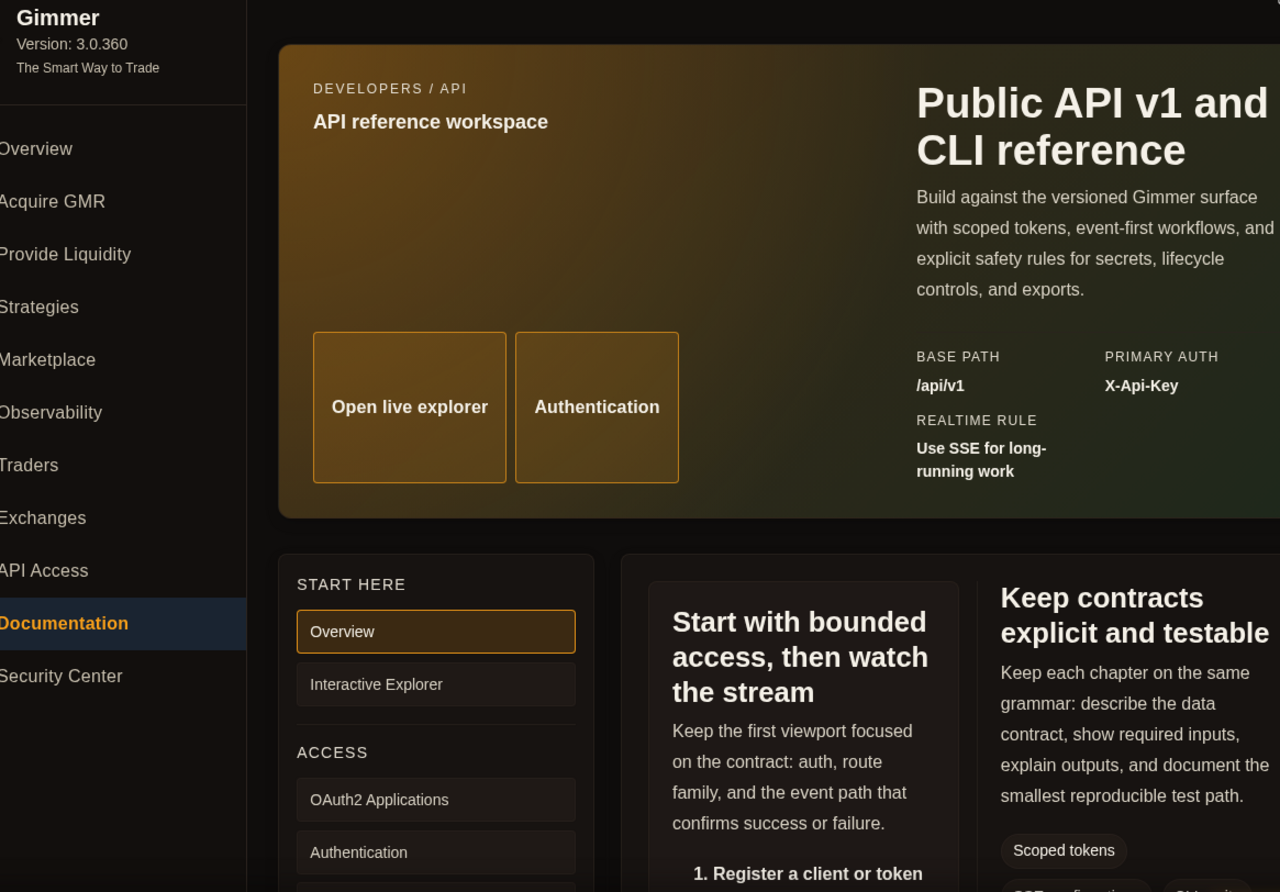
In Gimmer’s current app route, the docs workspace makes its job explicit. The top-level framing uses the shipped labels API reference workspace and Public API v1 and CLI reference. That matters because the page is not pretending to be a trading screen or an admin console. It is telling the operator exactly what kind of reference surface they are looking at.
The current overview also keeps a few practical boundaries visible:
- Base path:
/api/v1 - Primary auth:
X-Api-Key - Realtime rule:
Use SSE for long-running work - Reference actions: Open live explorer and Authentication
Those are the kinds of details an operator should be able to confirm before changing a bot, testing a route, or handing off a problem to engineering or QA. They reduce ambiguity without pretending to remove risk.
A Practical Pre-Flight Routine
If you want the docs workspace to function like a handbook, use it the same way every time before a privileged action.
- Confirm which route family you are actually using and whether the current task belongs in the versioned public API reference.
- Check the auth requirement before you assume a token or session model applies.
- Inspect the payload shape and the expected response so you do not improvise fields under pressure.
- Review the scope boundary or CLI equivalent when the work may be easier to execute or audit outside the browser flow.
- Confirm the right follow-up signal, especially when the route depends on a stream or longer-running completion path.
That routine is narrow by design. It does not tell you that the action is safe. It tells you that you understand the contract better before you continue.
Where The Direct /docs Explorer Fits
One of the easiest ways to misdescribe this workflow is to collapse the entire docs surface into one route. The cleaner description is more precise: the in-app docs workspace at #/docs is the handbook-like reference surface, and the direct /docs route is the live explorer handoff when you need standalone request execution.
That is why the product uses the action label Open live explorer instead of treating the explorer as the same thing as the workspace overview. The workspace helps you inspect the contract. The direct explorer helps you move into live request testing when that is the right next step.
The interactive chapter inside the workspace also keeps that relationship visible. It points to the explorer source as /docs, shows the spec path as /api/openapi.json, and frames the section as a handoff path rather than the primary reference model for every route in the product.
What This Workflow Helps You Confirm
The most responsible public claim here is not that the docs route does everything. It is that the docs workspace gives operators a place to confirm the details that matter before they continue with a live workflow.
In practical terms, that means you can use it to confirm:
- auth requirements before a privileged action;
- payload shape before you send or script a request;
- scope boundaries when a token-based route is involved;
- CLI equivalents when terminal execution is the cleaner operating path; and
- the right confirmation stream or follow-up surface when the work will not complete instantly.
That is valuable because operational mistakes often come from false assumptions about one of those five points, not from a lack of ambition or tooling.
What Gimmer Is Not Claiming
This article is not claiming that the docs workspace is a full live console for every public route, a security guarantee, or a substitute for QA. It is also not claiming that all API and CLI behaviors are perfectly interchangeable.
The honest value is narrower and more useful. Gimmer’s docs workspace helps technical operators inspect the current contract, review the right labels, and move into the next step with less guesswork than a memory-only workflow.
That distinction matters because reliable product trust is built by saying exactly what a surface helps you do now, and by refusing to borrow certainty from features it does not actually ship.
Final Thoughts
A good handbook does not replace judgment. It gives you a stable place to check the rules before you act. That is the right way to use Gimmer’s docs workspace today: confirm the contract, inspect the route, verify the next confirmation path, and only then move on to the live action.
It is a small operating habit, but it is the kind that keeps technical work calm when the rest of the workflow gets noisy.
Want a cleaner pre-flight step before your next privileged action? Open Gimmer, start in the docs workspace, validate one route or CLI equivalent, and then continue with the live workflow you actually intend to run.
— The Gimmer Team