
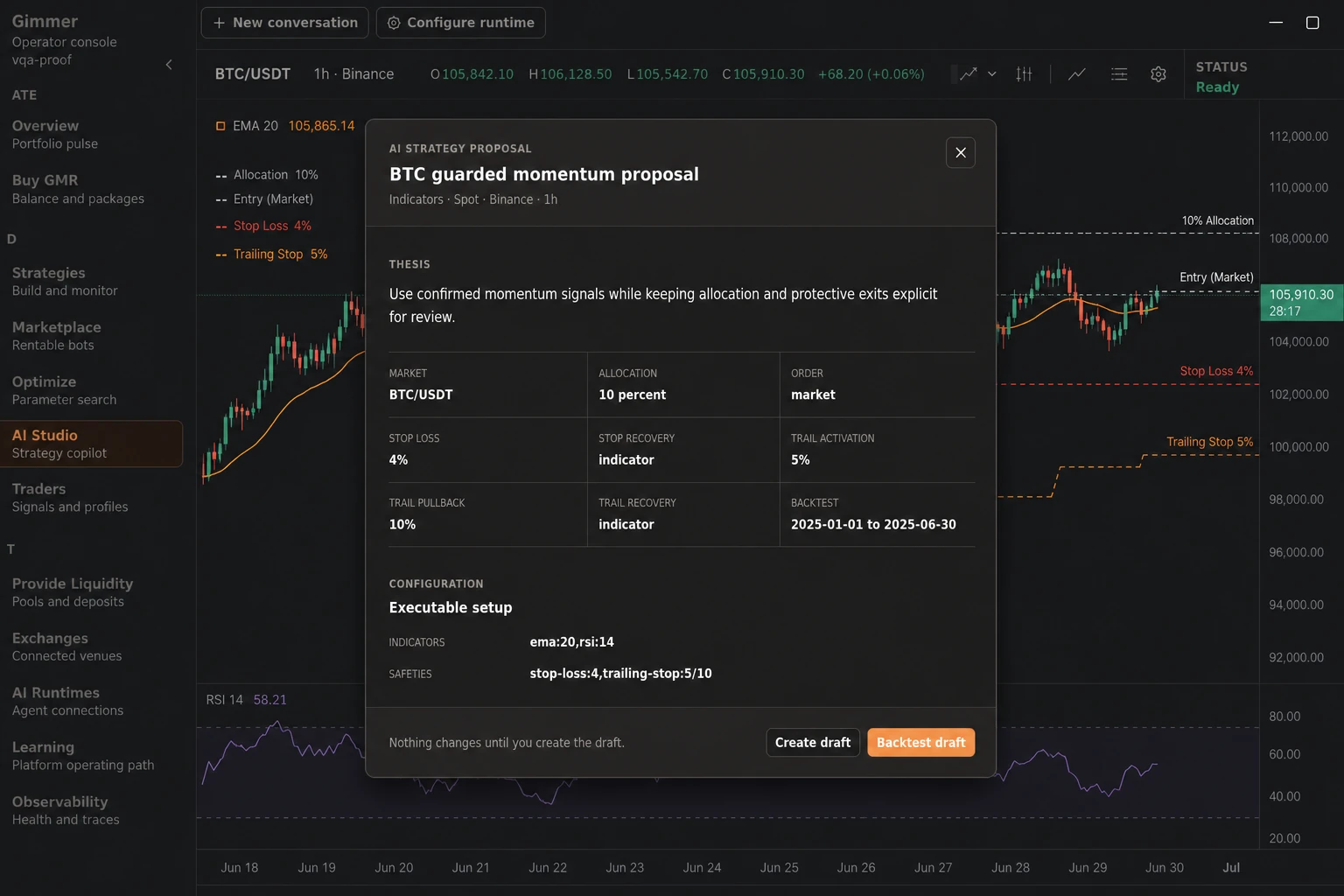
AI can help a crypto strategy designer organize a question, but a generated answer is not evidence by itself. In Gimmer, AI Strategy Studio turns a bounded prompt into a structured strategy proposal that you can inspect before it becomes a stopped draft or enters the existing backtest workflow. In an active Studio session, Gimmer may automatically create the validated proposal as a stopped, unpublished draft and continue to a baseline backtest, with the proposal and activity history remaining inspectable.
That distinction matters in crypto trading automation. The useful outcome is not a confident-sounding recommendation. It is a reviewable chain: define the question, inspect the proposed market and rules, check the risk boundaries, and run historical evidence before you decide what to do next.
1. Start with a bounded strategy question
Open AI Strategy Studio from Gimmer’s #/ai-studio route or the global strategy-copilot surface. Before sending a prompt, select an AI runtime that is configured, enabled, and ready. The workspace shows the selected runtime and the conversation used for the request.
A narrow prompt gives you a clearer review target. State the market context, timeframe, strategy goal, risk constraints, and what you want to compare. For example, ask for a spot strategy proposal for a named crypto pair, a defined candle interval, and a historical test window. Avoid treating a broad request such as “find the best crypto trading strategy” as a testable specification.
The Studio may return a response that needs clarification or regeneration. That is part of the workflow: the request should become more precise when the proposal does not express the question you intended to test.
2. Read the proposal as a contract for review
When the runtime returns a valid proposal, open the AI strategy proposal view. Start with the thesis, then read the concrete fields that make the proposal testable:
- market, quote asset, timeframe, allocation, and order type;
- stop-loss, stop-recovery, trailing activation, and trailing pullback settings;
- the proposed historical backtest window and starting balance;
- the executable configuration, such as indicators, portfolio allocations, custom TypeScript, or AI decision settings;
- entry rules, exit rules, and the risk limits that constrain the draft.
This is where a prompt becomes a reviewable artifact. Ask whether the rules actually express the strategy question, whether the market and timeframe are intentional, and whether the risk controls are understandable. If a proposal depends on an assumption you cannot explain, keep the draft in review and refine the prompt instead of treating the output as a recommendation.
3. Know the invalid state
A proposal can be marked as unable to be applied when its structured fields are malformed or do not satisfy Gimmer’s strategy contract. The interface identifies that state and tells you to continue the conversation and ask the AI to regenerate the proposal with valid Gimmer fields.
An invalid proposal is a useful stop signal. Do not copy partial values into a live workflow or infer that a model response is executable because it sounds plausible. Regeneration should produce a new, inspectable proposal whose configuration and explanation agree.
4. Understand the stopped-draft and backtest handoff
A valid proposal is a reviewable artifact with a suggested historical window and starting balance. In an active Studio session, Gimmer may automatically create the validated proposal as a stopped, unpublished draft and continue to a baseline backtest; the proposal and activity history remain inspectable. When the proposal is still ready, Create draft and Backtest draft are explicit handoff controls. Neither control starts live execution or publishes the strategy.
The explicit Backtest draft handoff seeds the existing backtest form with the proposal’s suggested dates and balance. Verify or adjust those inputs before running. Treat backtestPlan as a proposal, not proof that every later backtest used identical values; only the completed historical run describes the exact tested configuration and assumptions.
If you choose to create the draft without opening the backtest immediately, return to the saved strategy and verify the configuration before running anything. Look for mismatches between the thesis, the visible rules, and the protective settings. A clean handoff is more valuable than a fast handoff.
5. Read historical evidence without turning it into a promise
A backtest can help you inspect how the configured strategy behaved over the selected historical window. It cannot establish what a crypto market will do next, and it cannot turn an AI proposal into a profitability guarantee.
Keep the review question specific. Confirm that the period and starting balance match the question you asked, read the available result and risk surfaces together, and record what the test does not answer. If the result is difficult to explain, the sample is too narrow, or the assumptions changed, revise the question and run a new test rather than stretching the conclusion.
A practical AI crypto strategy review checklist
- Is the selected AI runtime configured, enabled, and ready?
- Does the prompt define one strategy question, market context, timeframe, and risk boundary?
- Do the proposal thesis, configuration, entry rules, exit rules, and risk limits agree?
- Is the proposal valid, or did the interface ask you to regenerate it?
- Has a stopped, unpublished draft been created, or is Studio already applying it, before the backtest starts?
- Does the backtest window answer the question you actually asked?
- Are you treating the historical result as review evidence rather than a forecast or return promise?
Conclusion
AI Strategy Studio is most useful when it makes strategy design easier to inspect. Use a bounded prompt, read the proposal fields as a test contract, stop on invalid or unclear output, verify the stopped draft and backtest handoff, and review the completed historical run before drawing stronger conclusions. A proposal is not a backtest result, execution decision, forecast, or return guarantee. The goal is a traceable review path from idea to evidence, not a shortcut around judgment.
To begin, configure and test an AI runtime, open AI Strategy Studio, and write one crypto strategy question you can explain before you ask for a proposal.
Pingback: Crypto AI Agent Controls: Keep Decisions Inside Boundaries – Gimmer – Automated Crypto-Trading