
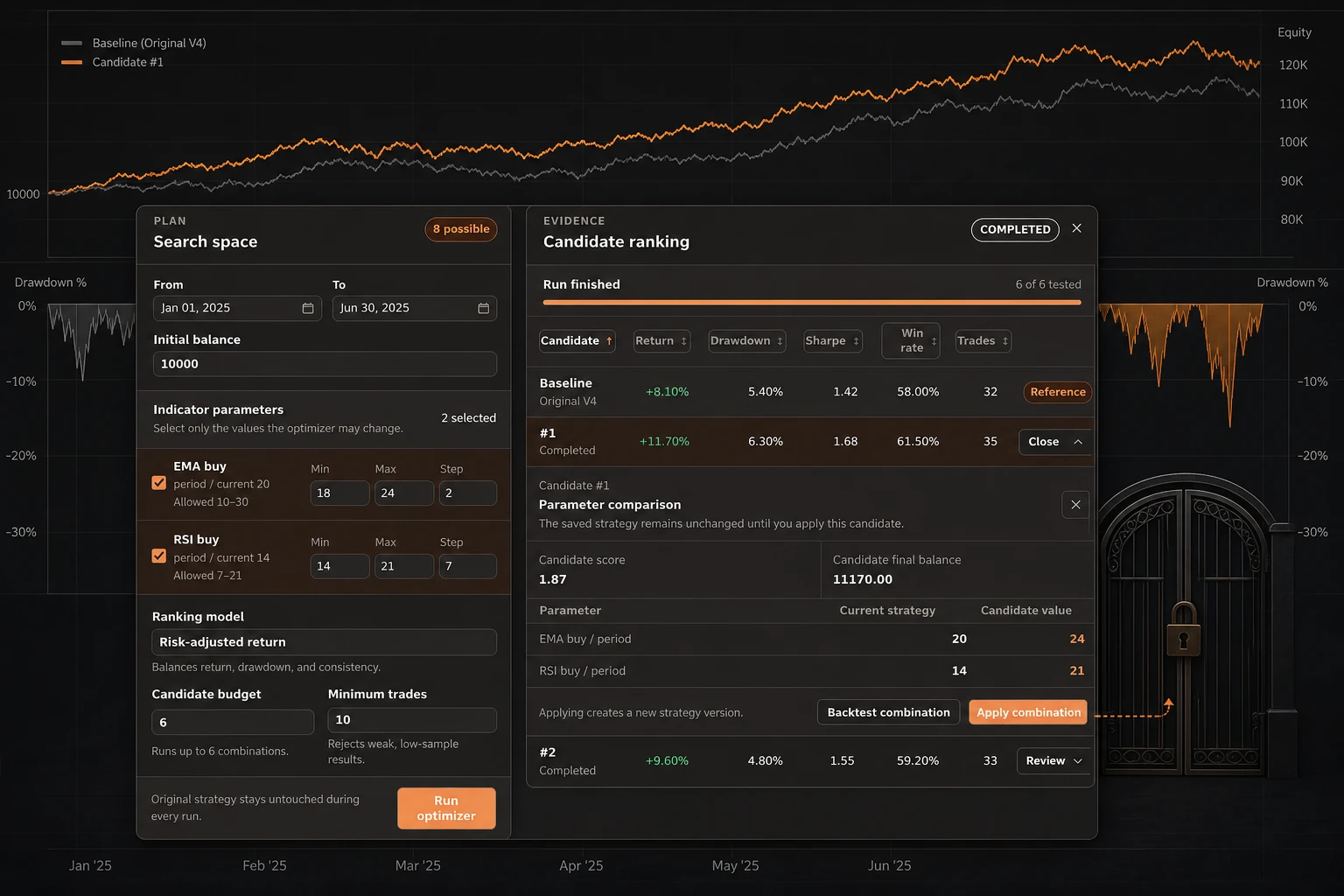
Crypto trading strategy optimization is easiest to misuse when a ranked result is treated as an instruction. Gimmer’s Strategy Optimizer is better understood as a review workspace: it tests bounded parameter combinations against one configured historical period and initial balance, shows the resulting candidates beside the original strategy, and keeps the saved strategy unchanged until you explicitly apply a candidate.
The useful question is not “Which setting guarantees a better result?” Historical backtests cannot answer that. The safer question is: “What changed, what evidence did the candidate produce, and is that change worth carrying into a new strategy version?”
1. Define the search before you run it
Open the Optimizer tab for a saved, owned Indicators or Swing strategy with runtime-safe tunable parameters. Rented strategies are read-only. For indicator strategies, numeric inputs use a minimum, maximum, and step. On the current Swing execution-settings path, supported rule-based controls let you choose the policy being compared.
Then set the shared optimizer context:
- the historical period;
- the initial balance used for the comparison;
- the candidate budget;
- the minimum trades you will accept.
Gimmer labels this comparison Risk-adjusted return. In the current workspace, that is a relative ranking of eligible candidates in this run using return, drawdown, Sharpe ratio, profit factor, and win rate; it is not a forecast or promise of live performance.
Keep the search bounded. A smaller, clearly stated parameter question is easier to inspect than a large range that produces a result you cannot explain. The optimizer is a bounded comparison, not an exhaustive search or a recommendation engine.
2. Keep the baseline in view
The optimizer creates a baseline from the original strategy using the same period and balance as the candidate comparisons. Read that baseline before reading the ranked rows. It is a reference row, not a recommendation, and gives you a way to see what changed when a candidate uses different parameter values.
The candidate table exposes the comparison fields used by the current workspace, including return, drawdown, Sharpe ratio, win rate, and trade count. These are historical observations from the configured test. They are not guarantees, recommendations, or evidence that a candidate will behave the same way in a different market. Candidates below the selected minimum trade sample remain visible but are not ranked or applicable.
3. Review the candidate, not just its rank
Select Review on a current completed non-baseline candidate to open its parameter comparison. The inspector shows the current strategy value beside the candidate value, along with the candidate score and final balance when those results are available.
Check four things before going further:
- Which parameters changed?
- Did the candidate meet the configured Minimum trades value?
- Does the drawdown and trade count make sense for the question you were testing?
- Is the candidate based on the current strategy version and configuration?
A completed candidate below the configured Minimum trades is shown as Not eligible and cannot be applied. If Minimum trades is set to 0, that sample filter is disabled. Failed, cancelled, and incomplete candidates remain non-applicable.
If the current source version or configuration no longer matches the run snapshot, the run is stale for application; start a new run before applying a candidate.
4. Open a full review when the summary is not enough
For a current completed non-baseline candidate, Backtest combination opens an isolated historical review. The review can use its own period and initial balance, separate from the optimizer run. After Run Backtest, the available result surfaces can include the chart, report and risk metrics, drawdown, positions, orders, and execution summary.
Opening the review is side-effect free. The candidate-review run starts only after you click Run Backtest. Wait for a terminal result before interpreting the evidence as complete.
Running the optimizer or a candidate review does not apply the candidate or start live trading. Apply combination is a separate confirmed configuration change that creates the next strategy version.
5. Apply only after an explicit decision
When a completed candidate remains acceptable after review, Apply combination is the deliberate change point. Gimmer asks for confirmation and applies only a completed, ranked, non-baseline candidate from the unchanged source version, creating a new strategy version. The optimizer history remains available for context while the retained review artifacts remain available under their current retention state.
Applying a candidate changes the strategy definition; it does not turn historical evidence into a live-trading guarantee. If the result is difficult to explain, the trade sample is too small, or the source version is stale, keep the current version and refine the review question instead.
A practical crypto strategy optimization checklist
Before applying any candidate, confirm:
- the parameter range and step describe a question you can explain;
- the baseline and candidates use the same period and balance configured for the optimizer run;
- the candidate is completed and eligible under the chosen minimum trade sample, unless Minimum trades is 0 and the sample filter is disabled;
- the parameter comparison matches the change you intend to make;
- drawdown, trade count, and the rest of the report have been reviewed together;
- the source strategy version and relevant configuration have not changed;
- you understand that historical backtest results do not predict future outcomes.
Conclusion
Crypto trading strategy optimization is most useful when it stays reviewable. In Gimmer, define a bounded search, compare candidates with the original baseline, inspect the evidence behind a candidate, and use the explicit apply step only when the change is clear. A candidate is a proposal to review, not a promise about what a market will do next.
Pingback: Crypto Backtest Overfitting: Control Trials Before Reading Results – Gimmer – Automated Crypto-Trading