
Connecting an exchange API key is one of the highest-trust steps in any automation workflow. The useful question is not whether a platform can make the step sound easy. It is whether the workflow makes permissions, status, and next actions clear before you attach anything to live automation.
Why This Step Deserves More Than A Quick Paste
An exchange key can open a useful automation path, but it also creates a trust boundary. That is why the quality of the workflow matters more than the speed of the setup.
A responsible setup flow should help users answer practical questions before they move on. What permissions does this key actually need? Is this key meant for monitoring only or for live automation? Can I tell what I already saved? Can I review the status before I attach it to a live strategy?
Those are not abstract security questions. They are the day-one checks that reduce avoidable mistakes.
What Gimmer Shows Today
Gimmer’s current exchange workflow is useful precisely because it stays concrete.
On the main Exchanges page, the setup guide frames the path as Pick exchange, Add credentials, and Verify status. The page also keeps the operating context visible by showing connection metrics such as connected exchanges, active API keys, and DEX wallets.
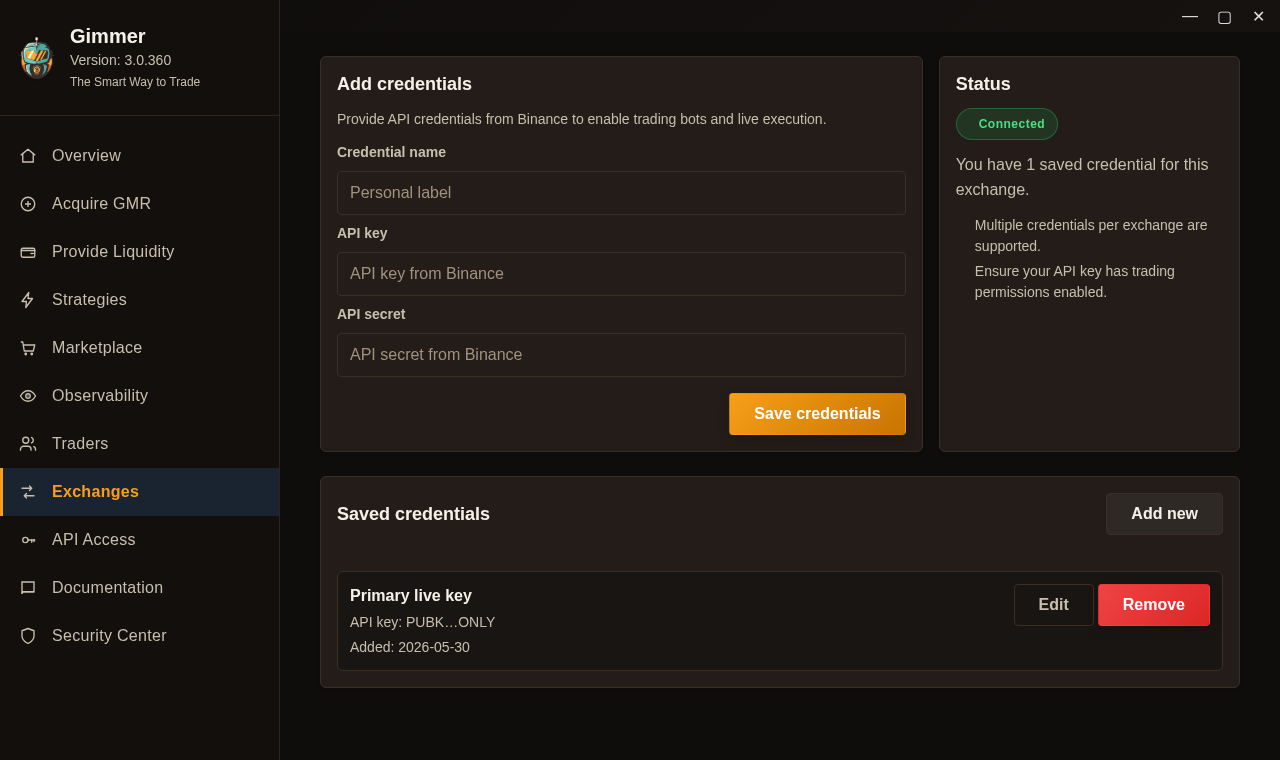
On the exchange detail route, the work is organized into three direct panels: Add credentials, Status, and Saved credentials. That matters because users can see the form they are filling, the current connection summary, and the list of stored credentials in one place instead of guessing what happened after a submit action.
The current flow also supports a few practical habits that should not be treated as extras. You can label a credential clearly, review masked key references later, edit an existing entry, and remove a stored credential when it is no longer appropriate. The status panel also makes two boundaries explicit: multiple credentials per exchange are supported, and the user still needs to verify that the API key is configured for the intended use.
How To Keep Permission Scope Narrow
The safest public guidance here is not a slogan. It is a scope decision.
For live automation on centralized exchanges, use a least-privilege API key with trading enabled and withdrawals disabled. For monitoring-only or market-data-only use, keep the key read-only.
That distinction matters because “read-only” and “ready for live automation” are not the same thing. A user who wants alerts or market visibility does not need the same permission set as a user who intends to let a strategy place orders.
Separating those two cases keeps the article honest and gives the operator a clearer standard for deciding what kind of key to generate in the first place.
What Not To Assume After Saving A Credential
Saving a key is a workflow milestone, not a blanket endorsement to go live. A serious operator should still review what Gimmer shows about the exchange, confirm that the intended credential is the one on record, and keep the live scope as narrow as possible.
Saving a credential is not the same as being live-ready; verify runtime status in Gimmer before attaching it to live automation.
That sentence is intentionally narrower than a promise. It does not claim that the market becomes safe, or that the key setup becomes risk-free. It only sets the right expectation: credential storage and live automation are related steps, but they should not be treated as the same decision.
What Gimmer Is Not Claiming
This workflow article is not a claim about internal encryption design, secret-isolation architecture, or guaranteed key safety. It is about the current user-visible flow and the safer habits that flow should support.
That distinction matters because trust in an automation product is built by staying precise. Users need a clear next step more than they need a dramatic promise.
Final Thoughts
The right way to connect an exchange key is slower and quieter than most marketing copy suggests. Pick the exchange deliberately, generate the narrowest permission scope that matches the job, save the credential with a clear label, review the status, and only then decide whether live automation is justified.
That is the standard worth holding any automation workflow to.
Want to review your exchange setup with more discipline before you attach it to automation? Open Gimmer, connect one credential with the narrowest valid scope, and verify the status before you go any further.
— The Gimmer Team