
Choosing a market sounds like a charting decision, but the earlier decision is usually more important: which exchange, connection model, and setup surface belong to the workflow you are about to run. Gimmer’s exchange directory is useful because it gives you a place to review that setup before you choose a market or enter credentials.
Why The Directory Comes Before The Market
The wrong first question is often, Which market should I trade? A better first question is quieter: Which venue and connection model actually belong to this workflow?
That distinction matters because market selection without connection clarity leads to rushed setup. A user can start thinking about symbols, pairs, or automation long before they confirm whether the route belongs to a centralized exchange, a wallet-based path, or a venue they have not connected yet.
Gimmer’s exchange directory is valuable because it gives that earlier decision a visible home. It helps the user inspect the connection surface before they move into the next step.
What The Exchanges Page Shows Today
The current route keeps the framing practical. When the setup guide is visible, it is organized around Pick exchange, Add credentials, and Verify status. That sequence is useful because it reinforces the right order: identify the venue first, then handle credentials, then confirm the current state.
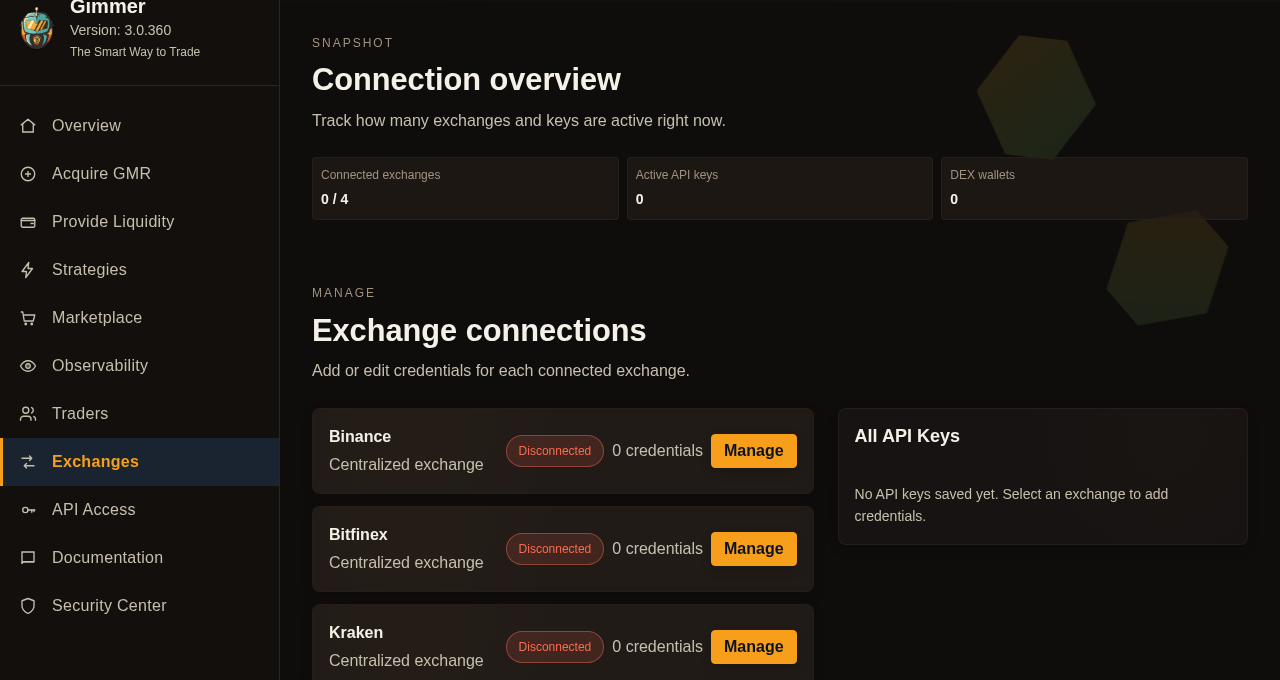
Once the guide is out of the way, the page keeps the operating context visible with a Connection overview section. The current layout shows counts for Connected exchanges, Active API keys, and DEX wallets.
The main working area is labeled Exchange connections. Each card shows the venue type, the current status, the credential count, and a Manage action. On a fresh workspace with no saved credentials, the side panel stays explicit as well: All API Keys, followed by the empty-state message that tells the user to select an exchange before adding credentials.
That matters because a user does not need to guess what the page is for. The route clearly reads as a connection directory, not as a market-ranking screen.
Decide What Kind Of Connection You Actually Need
Before choosing a market, take a simpler inventory.
- Are you reviewing a centralized exchange workflow or a wallet-based path?
- Do you already have a saved credential for that venue, or are you starting from zero?
- Does the next step require a credential at all, or do you still need to decide whether the venue belongs in your workflow?
Those questions are more useful than jumping straight to a pair list. They keep the user focused on setup truth instead of setup momentum.
That is also why the directory should be treated as a pre-flight surface, not as a final execution decision. It helps you confirm what kind of connection you are dealing with before you enter credentials or move into the next setup step.
Use The Directory As A Pre-Flight Checklist
A practical operator habit can stay very small.
- Open the Exchanges route before you choose the next market-related action.
- Confirm the venue type and whether the exchange already has any saved credentials attached.
- Review the current connection counts so you know whether you are working from an empty state or an existing setup.
- Only then expand the relevant exchange and decide whether adding or editing credentials is the right next step.
- If the venue requires credentials, pause and review the permission scope you plan to grant before you continue.
This workflow does not validate the market choice, approve the permission scope, or confirm live-trading readiness. It simply reduces guesswork before the user moves deeper into the setup.
What Gimmer Is Not Claiming
The exchange directory is not a market screener, a venue ranking system, or a promise that one exchange is better than another. It does not tell you which market will perform well, it does not turn a saved credential into automatic live readiness, and it does not verify whether an exchange-side permission set is appropriate for live use.
The honest value is narrower and more useful. Gimmer gives users a place to review the connection surface, confirm the current state, and choose the next step with fewer assumptions.
That boundary matters because trust comes from precision. A connection page should help the user inspect the setup they have, not borrow certainty from decisions it cannot make for them.
Final Thoughts
Before you choose a market, choose clarity. Review the venue, inspect the connection state, and confirm whether the workflow belongs to that exchange at all. That small habit is more valuable than rushing into a pair or entering credentials too early.
Gimmer’s exchange directory is useful when it is treated that way: as the place where the connection decision gets clarified before the market decision begins.
Want a cleaner start before you connect an exchange or choose a market? Open Gimmer, begin with the Exchanges route, inspect one venue, and only then take the next setup step.
— The Gimmer Team