
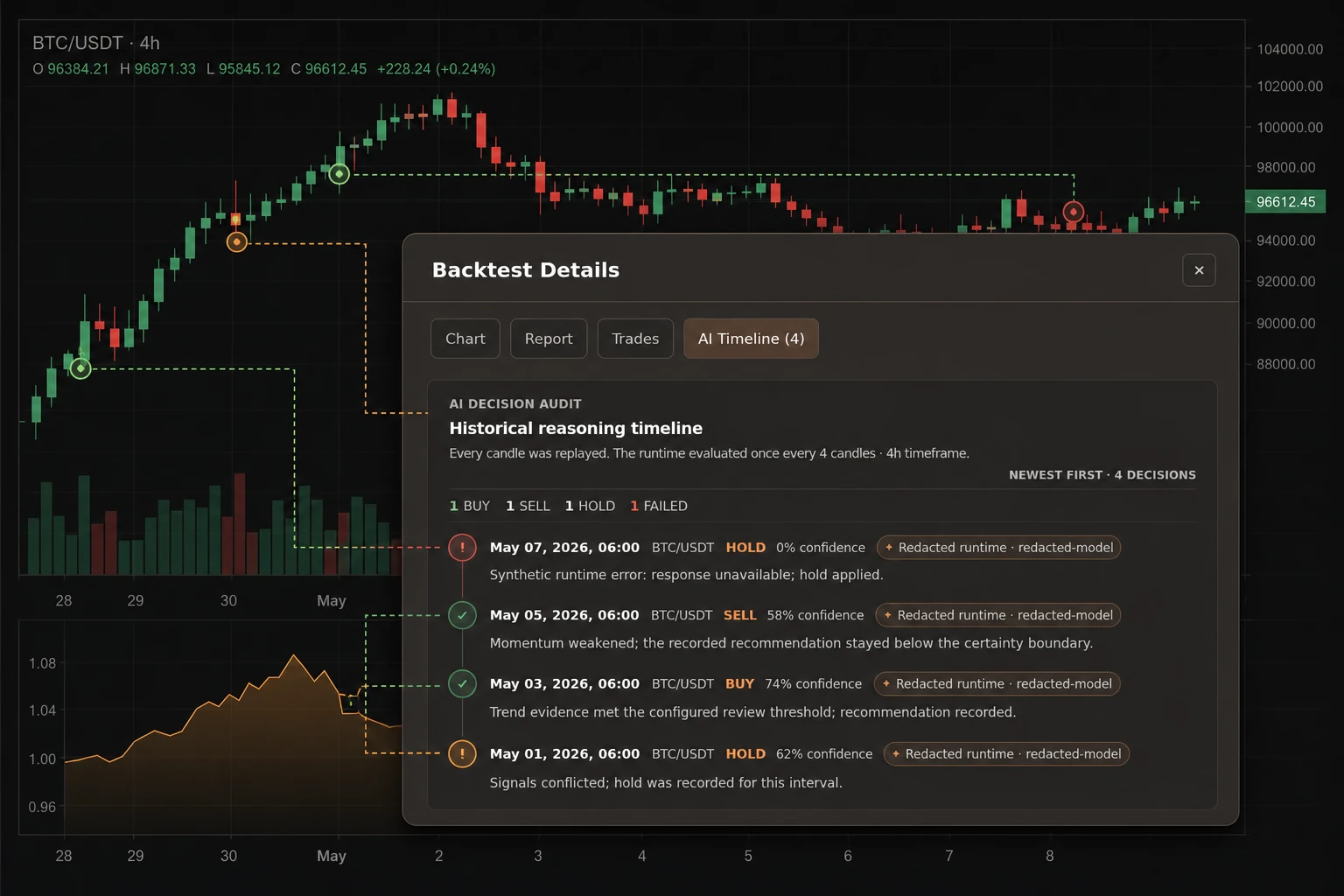
An AI crypto backtest can produce information that looks decisive at first glance. A timeline may show recorded buy, sell, and hold actions beside a recorded confidence value, a runtime/model label, and a recorded reason. Those fields are useful only when they remain attached to the historical run that produced them.
When a saved AI Decision strategy has recorded audit data, opening a selected historical backtest can show an AI Timeline for that run. The audit records attempted decisions at the configured cadence, including completed runtime responses and failed attempts. It is historical review evidence—not a live recommendation feed, prediction score, execution record, or performance guarantee.
A practical reading order is simple: identify the historical run, read its cadence, inspect each decision as a complete record, and compare the audit with the tested configuration and broader backtest result.
Start With One Selected Historical Run
After signing in, open a saved AI Decision strategy, go to Backtest, and select one completed historical result. The decision history belongs to that selected run. Open Backtest Details and choose AI Timeline.
The history is loaded for the signed-in user, current strategy, and selected backtest. One selected run can contain more than one symbol, so read each row’s symbol together with its candle timestamp, action, recorded confidence value, recorded reason, and status. Selecting the run prevents cross-run mixing; it does not imply one-symbol isolation.
The interface labels this an AI decision audit and calls the list a Historical reasoning timeline. Here, “audit” means a historical view of recorded events for one selected backtest; it is not a security certification, tamper-proof log, completeness guarantee, or performance score. “Historical reasoning timeline” is a product label, not permission to expose prompts, private provider output, or model chain-of-thought.
Before reading an individual row, confirm that you opened the intended strategy and historical result. If the test period or visible run summary is not the one you meant to inspect, stop and select the correct result.
Read the Decision Cadence Before the Confidence Value
The audit header shows the recorded decision interval in candles and the timeframe. The visible timeline is newest first. Its totals count completed buy, sell, and hold actions, with failed attempts shown separately.
The selected historical replay evaluates at its configured decision interval. A decision interval of several candles therefore does not represent a new opinion about every market movement. It describes a series of recorded evaluation points inside one historical replay.
Read the number of decisions alongside the interval and timeframe, not as a standalone measure of activity or quality. Two crypto trading bot backtests with different timeframes or decision intervals do not create directly comparable histories merely because both display confidence values.
Treat Confidence as a Recorded Value, Not a Probability of Profit
A completed row can display a rounded percentage derived from its recorded confidence value. Read that number as part of the runtime’s historical response for that evaluation point.
Do not translate a displayed value such as 74% into “74% likely to make money,” “74% likely to predict the next price move,” or “74% reliable.” The AI trading decision history does not establish any of those meanings. It records a value produced within the configured workflow.
In the current AI Decision configuration, a buy or sell response below the minimum-confidence setting becomes hold. A value equal to or above the setting is not thereby accurate, calibrated, profitable, or likely to predict a price move. The threshold is a deterministic action rule, not a quality score.
That current configuration does not automatically prove which threshold applied to an older selected run. Treat threshold and risk settings as historical facts only when the configuration or saved snapshot you inspect matches that run.
Read the Whole Decision Row
A useful review keeps each record together. Depending on the recorded event, the historical reasoning timeline can show:
- the historical candle timestamp and crypto symbol;
- the recorded buy, sell, or hold action;
- a rounded percentage derived from the recorded confidence value;
- the runtime/model label;
- the recorded reason;
- a source-status label when that field applies; and
- whether the evaluation completed or failed.
Start with the timestamp and symbol, then read the action, recorded confidence value, recorded reason, and status as one record. The runtime or model label adds decision-runtime context. It is not a provider endorsement or a ranking of security, reliability, availability, or quality.
The audit may show a source-status label; in historical backtests the current UI can show “disabled in backtest.” This label is an operational status label, not external validation, proof of source accuracy or freshness, or evidence that a live order was executed.
The panel also summarizes buy, sell, and hold totals and can show failed attempts separately. Those totals are a navigation aid. They do not explain position size, orders, fills, fees, slippage, drawdown, or the broader backtest result.
Keep a Recommendation Separate From an Executed Outcome
The runtime may return a buy, sell, or hold recommendation. The decision history does not show whether an order was submitted, filled, or profitable; compare the separate backtest result and positions for that tested run.
Gimmer’s strategy and order layers retain control of signals, positions, orders, and risk limits. An audit row records an attempted decision event. It does not prove that an exchange order was submitted, routed, filled at a displayed candle price, or produced a gain or loss.
This boundary matters in crypto trading automation because action labels can look like outcomes. “Buy” and “sell” are recorded decisions in this audit. They are not promises of a trade result or evidence of support for a named cryptocurrency exchange.
Read Failed, Empty, and Unavailable States Literally
The AI decision audit separates loading, unavailable, empty, populated, and failed-row states. Preserve those differences when you review or document a backtest.
If history is unavailable or an evaluation fails, describe only the visible state needed for the next step. Do not publish raw error text. A failed row records a failure for that evaluation point; it does not establish a system-wide incident or root cause.
Likewise, an empty history supports only the narrow conclusion that there are no displayable events for the selected result. It does not support a conclusion about AI performance, runtime health, or the complete backtest.
A runtime/model label and source-status label are recorded context for that run. They are not a provider endorsement, quality ranking, proof of source accuracy or freshness, or evidence that a live order was executed. Runtime names, model labels, reasons, and errors may also be environment-specific or sensitive, so keep private diagnostics out of public screenshots and notes.
Compare the Audit With the Backtest Contract
Open the strategy configuration and the selected backtest’s visible summary. Confirm the pair, timeframe, decision interval, and test window; treat threshold and risk settings as confirmed only when the configuration or saved snapshot you inspect matches the run. The selected-result panel does not expose every threshold or risk field as a run snapshot.
Compare the audit only with run-scoped details actually shown for the selected result, such as its symbol or symbols, timeframe, test period, chart, report, positions, and initial balance. Do not infer a historical confidence threshold or risk configuration from the current strategy editor unless that value is separately evidenced for the selected run.
Then compare three layers:
- Visible configuration and run context: which pair or symbols, timeframe, interval, and test window can you actually confirm?
- Decision audit: which actions, recorded confidence values, reasons, source-status labels, and failures were recorded at the configured intervals?
- Backtest result: what do the chart, report, and positions show for that selected historical replay?
When those layers do not tell a coherent story, the right next step is investigation or another bounded test—not a stronger claim. Historical evidence can support comparison and review. It cannot guarantee future returns.
What the AI Decision History Can and Cannot Tell You
Used carefully, the history can help you:
- review the cadence used during a selected historical replay;
- inspect recorded buy, sell, hold, and failed events;
- read a recorded confidence value beside the reason and decision-runtime context;
- locate events that deserve closer comparison with the backtest report; and
- document which decision events were recorded for one selected historical backtest.
It cannot, by itself:
- predict the next cryptocurrency price movement;
- prove that a confidence value is calibrated, accurate, or reliable;
- prove that an order was placed or filled;
- replace position, fee, slippage, drawdown, and result review;
- identify a system-wide root cause from one failed row; or
- guarantee profitability or future trading performance.
A Practical AI Crypto Backtest Review Checklist
- After signing in, open one saved AI Decision strategy and select the intended completed backtest.
- Open Backtest Details and choose AI Timeline.
- Confirm the visible test period, symbol or symbols, timeframe, and decision interval.
- Read the decision interval before comparing individual recorded confidence values.
- Use the buy, sell, hold, and failed totals to orient yourself, not to score the strategy.
- Read each timestamp, symbol, action, recorded confidence value, reason, runtime/model label, source-status label, and status together.
- Keep recommendations separate from positions, orders, fills, and reported outcomes.
- Compare the audit with the selected run’s visible backtest summary and the matching strategy configuration.
- Write down one narrow conclusion that the selected historical evidence actually supports.
Conclusion
Gimmer’s AI Decision history is most useful when it makes an AI crypto backtest easier to inspect. Start with the selected historical run, read its configured cadence, keep every action attached to its recorded confidence value, reason, decision-runtime context, and status, and compare the audit with the broader backtest evidence you can actually confirm.
Confidence is a field in a historical record, not certainty about the market. Open a saved AI Decision strategy, select one completed row under Backtest, open Backtest Details, and choose AI Timeline. Read the configured decision interval, timeframe, action totals, and each recorded row. Compare that audit with the selected run’s visible backtest summary and the matching strategy configuration before drawing one narrow, historical conclusion.