
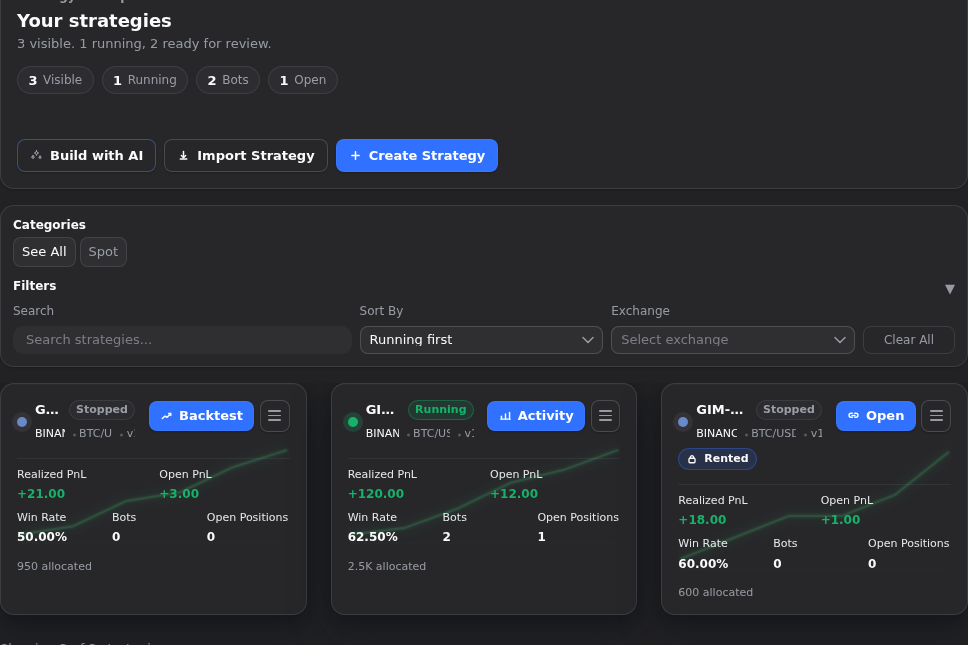
It is easy to treat the strategy board like a waiting room and the builder like the place where real work starts. Usually that costs time. Gimmer’s saved-strategy card already tells you more than people notice on the first pass. Before you open the full builder, the board can help you confirm that you are looking at the right strategy, whether it is running or stopped, which market context it belongs to, and which next action the workspace is already surfacing. That makes the card a triage tool, not just a shortcut.
This article is about the moment before a deeper route opens. It is not a full builder tutorial, and it is not a claim that one card replaces backtest or activity review. It is the smaller habit that helps you decide whether the builder is actually the next step.
Start On The Board, Not In The Deepest View
A calmer review habit is smaller than most people expect.
Open #/strategies and stay there for a moment. Gimmer already frames this route as a compact workspace where you can filter, inspect, and act before you go deeper. If you have more than one saved strategy, use the board first to narrow the visible set and identify the record that actually belongs to the decision you are making.
That matters because unnecessary route switching creates avoidable confusion. People open the builder to answer a question the card already answers, then spend time re-orienting instead of deciding. The board is useful precisely because it lets you reduce that overhead.
Confirm The Record Before You Confirm The Workflow
The first job of the card is identity.
Before you think about editing, backtesting, or activity review, confirm that you are looking at the right strategy. The saved-strategy card already gives you the name, a running or stopped state, and route-level metadata such as exchange, pair, and version. Those cues are small, but they protect you from opening the wrong record and diagnosing the wrong strategy.
That is the first reason to pause on the board. The builder can tell you much more, but it should not be the first place you go just to answer basic identity questions.
Use The Card To Decide Whether A Deeper Route Is Needed Now
A lot of wasted movement comes from opening the builder by habit.
Gimmer’s current board already tries to reduce that habit. The card includes a visible Recommended next step cue and one surfaced primary action instead of forcing the same entry path every time. Depending on whether the card is rented, running, or stopped, that surfaced action can be Open strategy, Activity, or Backtest, and the More strategy actions menu stays available when you need a different route.
That is a meaningful product signal. If the board is already surfacing the next step you intended to take, opening the builder first may only add friction.
Read The Visible State Before You Chase Detail
Once identity and next-step guidance are clear, the card can answer the next question: what state is this strategy in right now?
The current card layout gives you visible state cues without forcing another click. A status pill tells you whether the strategy is running or stopped. The metric tiles put recent state in front of you with realized PnL, open PnL, win rate, bot count, and open-position count. When the board has finite trend data, the sparkline adds one more compact clue without turning the card into a full analytics page.
That does not mean the card proves everything. It means you can decide whether the next step should be a deeper review, a different card, or no deeper action at all.
Let Filters Reduce Noise Before You Compare Cards
The card is more useful when the surrounding board is already under control.
If the workspace is crowded, use filters before you compare individual records. The board is designed to support that order. Narrow the visible set, then read the cards that still belong to your question. That is better than opening several builders in sequence and trying to remember which strategy matched which state.
This is one reason the article stays on the board instead of drifting into a builder tutorial. The value here is not only in the card layout. It is in the calmer reading order the board supports.
What The Card Can Tell You At A Glance
The saved-strategy card is useful because it answers the first triage questions directly:
- Am I looking at the right strategy record?
- Is it currently running or stopped?
- Which exchange, pair, and version am I about to inspect?
- Which realized PnL, open PnL, win rate, bot count, and open-position count are visible right now?
- Which next step is currently surfaced on the card?
If the card answers those questions well enough, the builder can wait until you truly need deeper context.
What The Card Does Not Prove
This is where the article needs restraint.
- A card is not proof that a strategy is safe to run.
- Visible PnL or trend cues are not a promise about future results.
- A compact board state is not a substitute for deeper backtest or activity review.
- The visible primary action is guidance for the next step, not a guarantee that every decision can stay on the board.
- The card is a triage surface, not the whole strategy story.
Those limits are useful. They keep the board trustworthy by letting it do the first job well instead of pretending to do every job at once.
A Practical Reading Order
If you want a repeatable board-first routine, keep it small:
- Open
#/strategiesand reduce the visible list if filters will help. - Confirm the strategy name and visible metadata before you click anything deeper.
- Check the card’s
Recommended next stepcue and surfaced primary action. - Read the running or stopped state and the visible metric tiles.
- Use the visible action when it already matches the next job.
- Open the builder only when the next step needs deeper configuration, backtest detail, or activity inspection.
This routine is modest on purpose. It gives the board a real operational role without asking it to replace the deeper surfaces that still matter.
Final Thoughts
The builder is important, but it should not be your first reflex every time you see a strategy card.
Gimmer’s saved-strategy board already gives you a better first move: confirm the record, read the visible state, and let the surfaced next action guide whether you need a deeper route at all. That small pause makes the workspace calmer, clearer, and easier to trust.
Open #/strategies, confirm the card is the right record, read the visible status and next action first, and open the builder only when the next step actually needs deeper detail.
– The Gimmer Team