
It is easy to treat CLI, API, and desktop as a style preference. In practice, the better question is narrower: what kind of strategy task are you trying to do right now? Gimmer’s current docs already draw a useful boundary. The CLI is the clearest place for scripted strategy commands and quick backtests already shown in the current reference, the API is the clearest place for scoped integrations, and the desktop strategy routes remain the clearest place to inspect or configure a strategy interactively. The mistake is assuming that those three surfaces are interchangeable just because they sit near the same strategy lifecycle.
Name The Next Task Before You Pick The Surface
The safest surface choice usually starts with the task, not with personal preference.
If the next step is a scripted command you want to run directly, the CLI is usually the cleanest fit. If the step belongs inside another service or integration, the API is usually the better fit. If the step depends on inspecting labels, fields, tabs, or configuration state interactively, the desktop route is usually the clearest fit.
That sounds simple, but it matters because a lot of confusion starts when operators treat neighboring surfaces as proof of full parity. They see strategy features in multiple places and assume the same step must exist everywhere else with the same behavior. The current public sources do not prove that. They prove narrower, useful task boundaries.
A Conservative Surface Guide
| Surface | Best fit today | Current public examples | What to verify next |
|---|---|---|---|
| CLI | Scripted or one-off strategy commands and quick backtests | gimmer strategy list, gimmer strategy save, gimmer strategy backtest |
Confirm the exact command for the next step instead of assuming every desktop or API action has a shell equivalent. |
| API | Scoped integrations and endpoint-driven strategy workflows | GET /api/v1/strategies, POST /api/v1/strategies, POST /api/v1/strategies/{id}/backtests |
Confirm the exact endpoint and request model you need instead of flattening the surface into a generic “same as CLI” assumption. |
| Desktop | Interactive strategy inspection and configuration | /#/strategies, /#/strategies/builder/spot |
Confirm the exact visible route and workflow state you need instead of assuming every interactive step is mirrored elsewhere. |
Use CLI When The Next Step Is Explicit And Repeatable
The CLI is strongest when the next strategy task is already clear and benefits from an explicit command path.
The current reference already gives safe public examples: gimmer strategy list when you need the current strategy list, gimmer strategy save when you need to save a strategy, and gimmer strategy backtest when you need to trigger a backtest from a known strategy context. Those examples make the CLI a strong fit for one-off operator commands, shell-driven habits, and lightweight scripted workflows.
The useful part is not that the CLI proves every strategy action is available in shell form. The useful part is that these specific commands are already documented literally and can anchor a real task without guessing. If the task in front of you already looks like “list, save, or backtest,” the CLI gives that work a narrow, unambiguous surface.
It also helps that the current reference keeps these commands close to the strategy domain instead of forcing the operator through a larger UI path first. That is the trust-safe reason to use the CLI here: the public docs already show the command you need, not because shell access is somehow the most complete surface in every case.
Use The API When Strategy Work Belongs Inside An Integration
The API becomes the better fit when the next task belongs in another system, service, or automation boundary.
The current public docs already prove a conservative set of strategy endpoints such as GET /api/v1/strategies, POST /api/v1/strategies, and POST /api/v1/strategies/{id}/backtests. That is enough to explain why the API surface is the right home for integration-driven list, create, and backtest workflows without claiming that every adjacent strategy action is already covered the same way.
There is also an important language boundary here. In current public guidance, versioned v1 requests use scoped X-Api-Key, while separate OAuth2 application records define client identity and scope boundaries before tokens are issued. That is worth keeping transport-literal, because this article is about choosing the right surface for the task, not about collapsing the auth model into a simplified slogan.
If the next question is “how does another system read or trigger this strategy workflow,” the API is usually the cleaner starting point. If the next question is “what does this strategy look like and how do I inspect or change it interactively,” the API is usually not the first surface to reach for.
Use Desktop When The Work Depends On Interactive Inspection Or Configuration
The desktop surface is strongest when you need to see or change strategy state interactively.
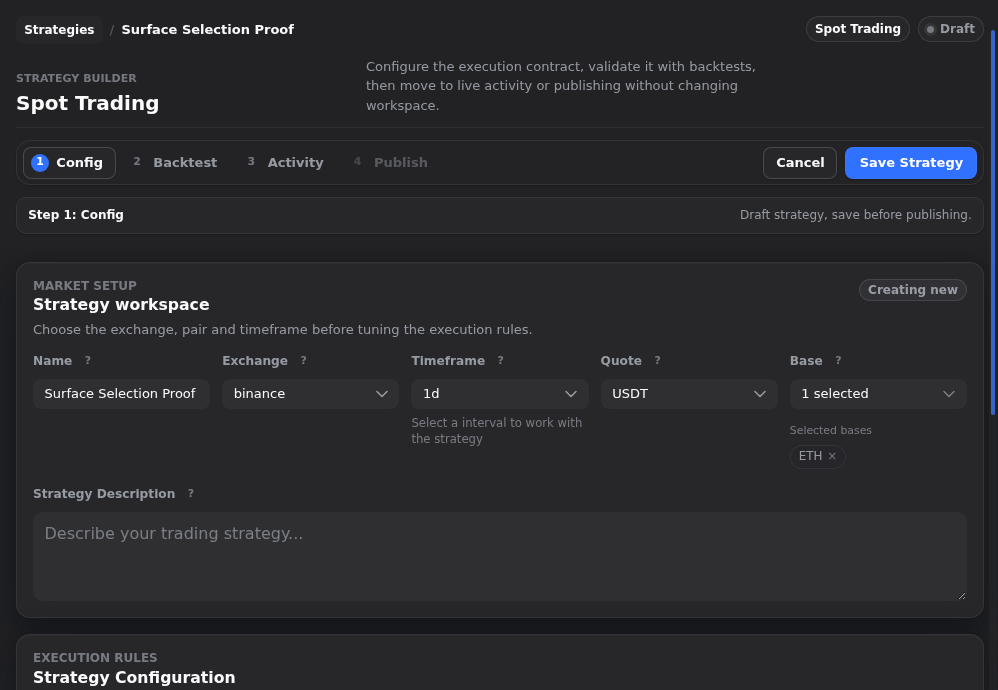
The current browser and Wails evidence already proves desktop-visible strategy routes such as /#/strategies and /#/strategies/builder/spot. That matters because strategy work is not always a command or an endpoint first. Sometimes the safer next step is to inspect the route itself, review the builder state, or work through configuration in the interface that is built for that job.
This is where the interactive surface earns its place. If you need to review the strategy list, move into the builder, inspect configuration fields, or use visible tabs like Config, Backtest, Activity, and Publish as part of your decision, desktop is usually the clearest route. The value is in the inspection and configuration context, not in a claim that the surrounding workflow is identical across CLI and API.
That distinction is important for trust. A route being visible on desktop does not automatically prove that the same sequence exists elsewhere with the same steps, the same state transitions, or the same wording. It only proves that the interactive surface is the better fit when the task depends on what you can inspect and configure there.
Useful Mappings Exist, But They Are Not A Parity Promise
Some of the public examples do line up closely enough to help you orient.
gimmer strategy list sits beside GET /api/v1/strategies. gimmer strategy save sits beside POST /api/v1/strategies. gimmer strategy backtest sits beside POST /api/v1/strategies/{id}/backtests. Those are useful anchors because they show that the current sources are talking about adjacent strategy work rather than about unrelated product areas.
But that is where the article should stay careful. Adjacent examples help you choose a starting surface. They do not prove end-to-end equivalence across CLI, API, and desktop. They do not prove matching auth flows, matching interactive states, or matching behavior for every strategy action that comes later.
The safest reading is smaller: the current sources already prove enough alignment to choose the next surface more intelligently, and they also prove enough limits to avoid overclaiming what that alignment means.
What This Comparison Does Not Prove
This article is intentionally narrower than a “full interface comparison.”
- It does not prove that every strategy action exists on CLI, API, and desktop with the same behavior.
- It does not prove that one surface is universally better than the others.
- It does not turn auth differences into a security ranking or a setup guide.
- It does not make claims about live-trading readiness, profitability, or outcome guarantees.
- It does not use bot-control examples as proof for this strategy-surface comparison.
That restraint is a feature, not a gap. A surface-selection article is more useful when it tells you where to start the next task safely than when it tries to flatten the entire product into one comparison chart.
A Safe Selection Routine For Strategy Work
If you want a practical rule, use this one:
- Name the next strategy task before you choose a surface.
- Use CLI when the next step is a known scripted command or quick backtest already shown in the current reference.
- Use the API when the next step belongs inside a scoped integration or endpoint-driven workflow.
- Use desktop when the next step depends on interactive inspection or configuration.
- Verify the exact command, endpoint, or route before you assume the same step exists everywhere else.
That sequence is modest on purpose. It helps you move faster without asking the public docs to prove more than they currently prove.
Final Thoughts
CLI, API, and desktop are all useful strategy surfaces in Gimmer. The calmer habit is to stop treating them as interchangeable labels and start treating them as task-specific tools.
That makes the next decision cleaner. Use CLI for explicit scripted commands already shown in the reference. Use the API for scoped integrations already shown in the docs. Use desktop when the work depends on interactive inspection or configuration. Then verify the exact step instead of assuming the whole workflow is mirrored everywhere.
Choose the surface that matches the task in front of you: CLI for scripted or one-off commands, API for scoped integrations, and desktop for interactive strategy inspection and configuration, then verify the exact route or command before you assume the same step exists everywhere.
– The Gimmer Team