
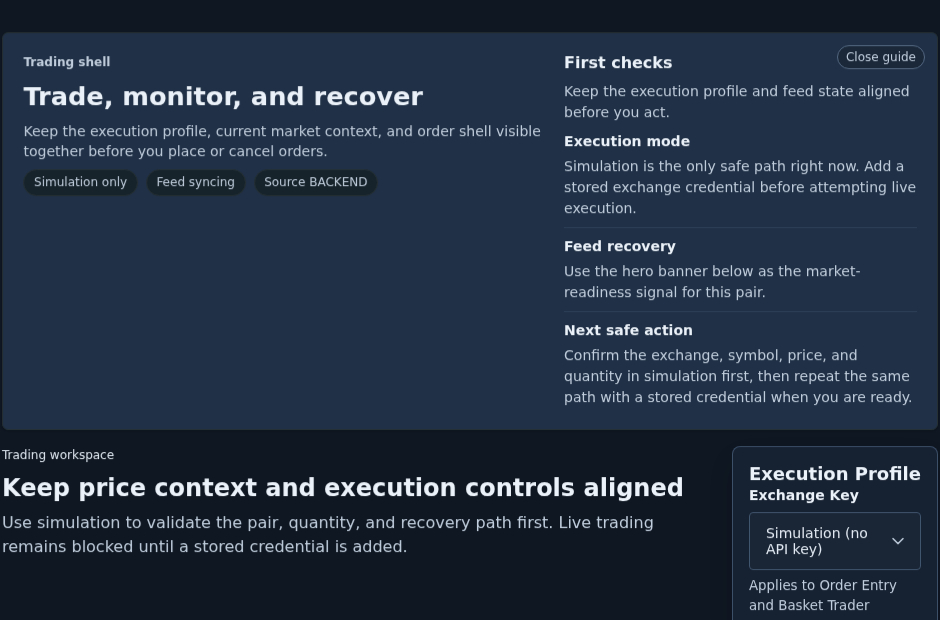
The fastest way to turn the Trading workspace into noise is to jump straight to live intent before the route has proved anything current. Gimmer’s current trading shell is calmer than that: it keeps Execution Profile, feed state, and Before you place an order visible together so simulation can stay first until the same pair, quantity, and shell still make sense for live execution.
Why Simulation Deserves To Stay First
Simulation is not decorative in the current route. It is the first safe path the workspace keeps available while the operator confirms what is actually on screen.
That matters because a trading shell can look ready before the route has finished proving anything useful. A selected pair can be visible. An order form can already be there. A live credential can already be selected. None of those facts, on their own, mean the current path is ready for live execution.
The current Trading workspace treats that boundary seriously. Instead of hiding the difference between rehearsal and live intent, it keeps the execution profile, market-feed state, and order guidance in the same reading flow. That makes simulation the right first step, not the timid one.
Start With Execution Profile, Not With The Order Button
The first useful check is the card Gimmer already puts at the top of the workspace: Execution Profile.
That card matters because it shows whether the route is still in Simulation (no API key) or whether a stored credential is already selected for live intent. The distinction is not cosmetic. It changes what the next action should be.
When the route is still using simulation, the product keeps the boundary explicit in the Trading route’s own support copy. The current shell can say that simulation is the only safe path right now, or that simulation stays active until you confirm the pair, feed, and quantity you want to send live. When a stored credential is selected, the route keeps the same caution in public view: live orders use the selected stored credential after the next runtime handshake, and the feed still has to confirm current prices.
That is the right moment to slow down. The route is not asking whether you feel ready. It is asking what execution mode you are actually in.
Use Feed State As A Real Gate
After the execution profile, the next useful boundary is the feed state.
The current route can expose status chips such as Feed live, Feed recovery, Snapshot pending, Feed syncing, and Feed idle. Those labels should shape the decision, not just decorate it.
If the route is still waiting on a first market snapshot or recovering the stream, the product already tells you what to do with that information. In the current proof set, the shell can say Simulation is the only safe path right now. Add a stored exchange credential before attempting live execution. It can also say Use simulation to verify the order shell while the first market update arrives. Restart the stream or switch pairs if prices stay pending.
The feed warning is not just commentary. The current shell also keeps submit, cancel, and basket actions locked until the first current snapshot arrives, so a stored credential still does not bypass market-readiness checks.
That wording is useful because it keeps the feed state attached to execution discipline. A visible pair is not the same thing as current price context. A current price context is not the same thing as live approval. The route makes those boundaries visible if you let it.
Keep Price Context And Execution Controls Aligned
The Trading workspace is strongest when you read the shell as one connected surface instead of as separate widgets.
The guide at the top says Trade, monitor, and recover. The section header reinforces the same idea by telling you to keep price context and execution controls aligned. That is more than design language. It is the route explaining the order in which the operator should trust what is happening.
Start with the execution mode. Check whether the feed is current. Keep the hero warning or readiness state visible. Then look at the pair, quantity, and confirmation path you are about to use. That order is calmer than jumping straight to live intent because it lets the current route state narrow what you should do next.
Read The Help Copy As Workflow Guidance, Not As Footer Text
The Before you place an order section is one of the clearest trust signals in the current trading route.
When simulation is still the correct path, the help copy can say Simulation remains available until the feed warning above clears. Save a least-privilege exchange credential before attempting live execution. When live credentials are already selected but the feed is not ready, the same section can warn that the feed warning should be cleared before placing or cancelling orders.
The right reading habit is to treat that section as the product’s plain-language summary of the current mode, not as a block of text to skim past. It tells you whether the route thinks you are rehearsing, waiting, or approaching a live action too early.
Switch To Live Only After The Same Path Still Makes Sense
Simulation earns its value when it makes the later live decision smaller, not louder.
Once the pair, quantity, shell behavior, and feed state all make sense in simulation, then the next comparison becomes useful: if you switch from simulation to a stored credential, does the same path still look correct? Is the pair still the one you meant? Is the feed still current? Are the confirmation states still visible? Does the route still describe the next step in a calm, current way?
If the answer changes when live intent becomes possible, then the route is telling you something important. Live execution should not start from a path you only trusted while the stakes were lower.
What This Workspace Does Not Prove
The current Trading workspace is useful, but it does not remove judgment.
Simulation does not guarantee that the next live order is safe. A stored credential does not prove that the route is ready for immediate live use. A visible shell does not prove that the market snapshot is current. And none of those states provide trading advice about whether the order itself is good.
What the route does provide is something more practical: a visible boundary between rehearsal and live intent, plus enough guidance to decide whether the next step is to stay in simulation, clear a feed warning, or move forward with a stored credential only after the same path still checks out.
A Practical Simulation-First Routine
A conservative routine in the current route looks like this:
- Open #/trading and read the route guide before you react to the shell.
- Check Execution Profile first so you know whether you are still in simulation or already holding live intent.
- Confirm the current feed state before you trust the visible pair and order shell.
- Keep the hero warning or readiness state visible while you verify the pair, quantity, and order path.
- Use Before you place an order as the route’s plain-language summary of what is safe to do next.
- Switch to a stored credential only after the same path still makes sense for live execution.
That routine is slower than hype, and that is the point. It keeps the next move attached to the current route state instead of to habit or urgency.
Final Thoughts
The best reason to start in simulation is not caution for its own sake. It is clarity.
In Gimmer’s current Trading workspace, simulation keeps the route honest. It gives the operator a chance to verify execution mode, feed state, and shell behavior before a stored credential turns the same path into a live decision. Read the route in that order, and the next step stays smaller, safer, and more defensible.
Open #/trading, keep Execution Profile, feed state, and Before you place an order visible together, rehearse the pair in simulation, then switch to a stored credential only when the same path still makes sense for live execution.
— The Gimmer Team