
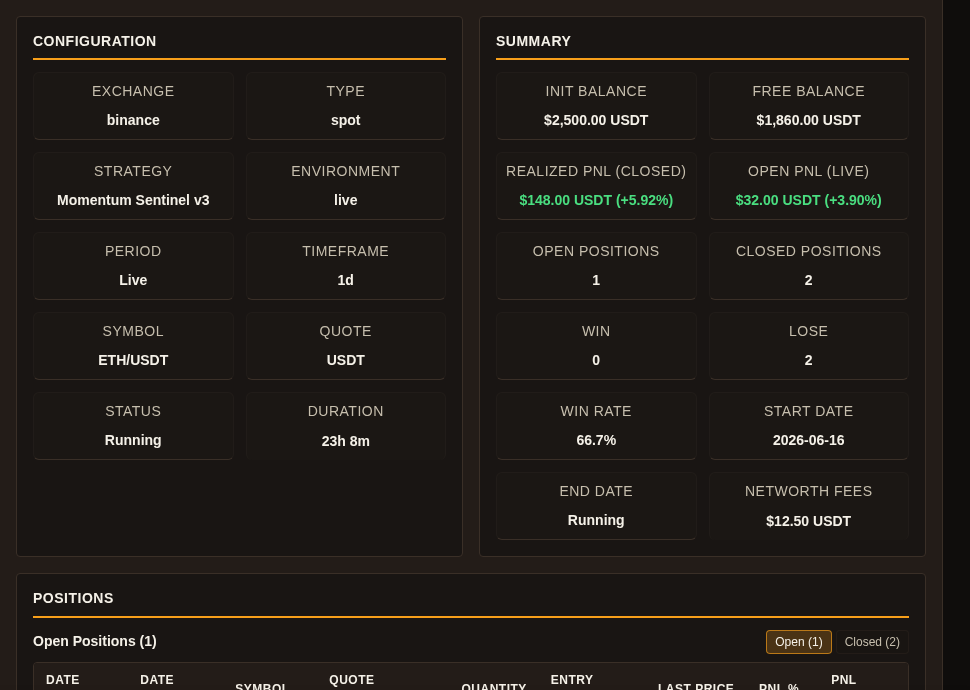
A better first habit on a live strategy is not to press start or stop first. In Gimmer, open Strategy Management, select the bot, read Strategy Details, and only then decide whether a control action is actually justified.
Why This Surface Matters
Not every strategy decision should start from broad portfolio context. Sometimes the real question is narrower: what is happening on this one bot right now, and does that justify touching the control surface?
That is where Gimmer’s Strategy Management route becomes useful. Open Strategy Management, select the bot you are about to evaluate, and the Strategy Details panel gives you a focused view of that strategy’s current state instead of forcing you to reason from broader context alone.
That does not mean the route answers every question. It means the route is the right first read when the decision is specifically about one bot.
Start With Status Before You Touch Control
The first thing to read is the visible Status field and the runtime state around it.
If the bot is already Running, Starting, Stopping, or Stopped, that label should shape your next move before you press anything else. A control action makes more sense when you can explain the current state first.
This is the practical value of opening Strategy Details before you act. The route turns start-or-stop into a context-driven decision instead of a reflex.
Use The Summary To Separate Current State From Assumption
After status, the summary tells you what kind of change you are actually looking at.
The most useful fields are usually Open PnL (live), Open Positions, Closed Positions, and the surrounding balance and duration context. Those values do not tell you what the market will do next, but they do tell you whether the bot is actively carrying exposure, whether it has recently completed activity, and whether the current state looks meaningfully different from what you expected.
The Performance Chart adds shape to that read. It can help you see whether the current state looks flat, recently moved, or worth a deeper check before you intervene.
The key is to use those elements as context, not as permission. They help you read the situation more clearly. They do not guarantee that the next action is safe or correct.
Check Positions Before You Assume A Bot Is Quiet
The POSITIONS section is where the article’s habit becomes more concrete.
The route lets you switch between Open and Closed positions. That matters because a bot can look quiet at first glance while still carrying open exposure, or it can look inactive even though the most recent meaningful activity is visible in the closed-position side.
Reading both tabs keeps the decision grounded. If the open side still holds live positions, stopping the bot means something different than it would on an entirely closed state. If only closed positions remain, the question may shift from immediate control to simple confirmation and review.
This is also why the positions view is more useful than a vague impression of whether the bot feels busy. It gives you something specific to inspect.
Read Strategy Logs Before You Escalate The Decision
The final surface worth checking before a control action is Strategy Logs.
Logs are not a guarantee of root cause, but they often tell you whether the bot is still producing visible runtime context, whether a recent action happened, or whether the next step belongs in deeper validation instead of an immediate stop-or-start response.
That distinction matters. Sometimes the right move is not to touch control yet. Sometimes the better move is to read the route completely, then validate more deeply elsewhere in Gimmer only if the one-bot surface still leaves the decision unclear.
A Practical Decision Routine
A small routine keeps this surface useful:
- In Strategy Management, select the bot and read Strategy Details before you touch a bot control.
- Read Status and Duration first so the current runtime state is explicit.
- Check Open PnL (live), Open Positions, and Closed Positions before deciding whether the bot is actually quiet, exposed, or recently changed.
- Use Strategy Logs as runtime context, not as a promise that the route has diagnosed everything.
- If the state still looks ambiguous, validate somewhere deeper before you start or stop the bot.
That routine is intentionally conservative. It helps the operator act from the route that already belongs to the bot instead of making a control decision from assumption alone.
What This View Does Not Promise
Strategy Details does not guarantee that a bot should be stopped, restarted, or left alone. It does not promise profit, it does not replace deeper validation when the state is still unclear, and it does not remove uncertainty from a trading workflow.
What it can do is improve the first decision. It helps you look at the specific bot’s visible state before you take an action that changes that state.
Final Thoughts
Good operator habits often begin with a smaller question than people expect. Not what should I do to this strategy? but what does this strategy’s own surface say right now?
In Gimmer, once you have selected the bot in Strategy Management, Strategy Details is the right first place to answer that question. Read status, summary, positions, and logs first. Then decide whether the next move is to act, wait, or validate more deeply.
Before you start or stop a bot in Gimmer, open Strategy Management, select the bot, read Strategy Details, and check Status, Open PnL, Positions, and Strategy Logs before you decide whether the next move is to act, wait, or validate more deeply.
— The Gimmer Team