
The safest next step in Gimmer is often not a retry. It is opening the right surface for the question you actually need to answer. If you need direction, start in Help. If the question is about contracts or auth, open Docs. If the question is runtime health, open Observability Hub before you assume the workflow is broken.
Why Route Choice Matters
Operators lose time when every question gets treated like the same problem. A contract question, a runtime-health question, and a path-selection question do not belong in the same place, and forcing them into one workflow usually creates more noise than clarity.
Gimmer already separates those jobs across visible routes. The practical habit is to open the surface that matches the question in front of you instead of bouncing between screens without a clear reason.
That habit will not remove uncertainty, but it does make the first troubleshooting step calmer and more trustworthy.
Start In Help When You Need Direction
The Help route is the right starting point when the real question is where should I go next?
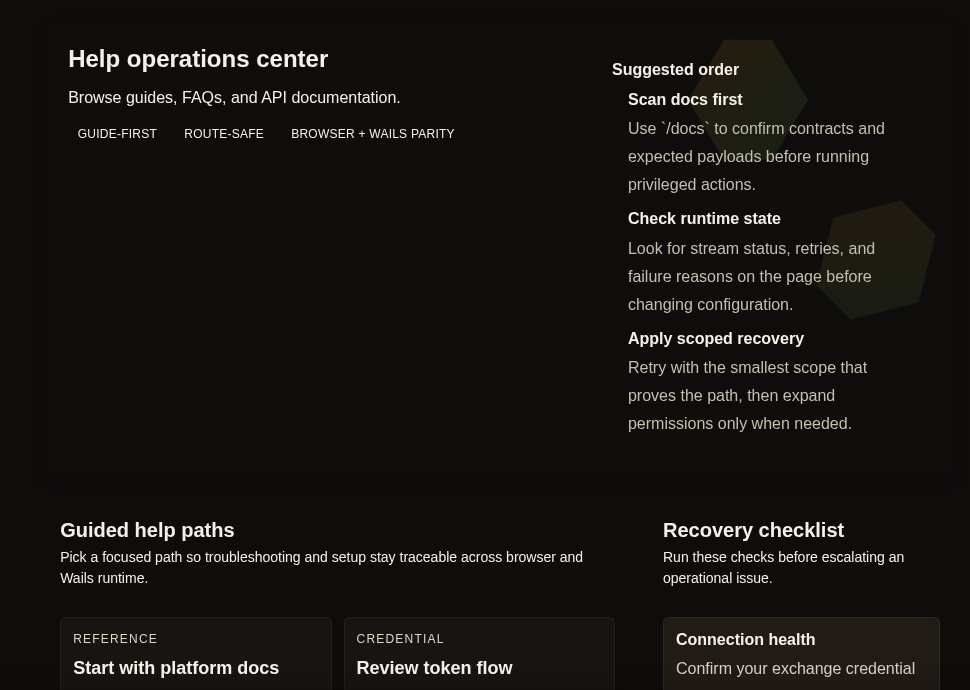
That route makes its job explicit. It opens as Help operations center and gives operators a visible Suggested order, a set of Guided help paths, and a Recovery checklist. That is useful because not every issue begins with a broken system. Sometimes the issue is simply that the next diagnostic step is unclear.
Use Help when the next step is unclear before you touch a credential, change a configuration, or continue troubleshooting. It is the right place to decide whether you need reference material, a route-specific retry, or a runtime-health first check elsewhere in the product.
That distinction matters for this article. Help sets the order for the next decision, even when the next destination is a different surface such as Docs or Observability Hub.
Open Docs When The Question Is About Contracts
The Docs workspace is the better choice when the question is about what a route expects rather than what the runtime is currently doing.
That includes questions about auth, payload shape, scopes, CLI equivalents, or the confirmation path you should expect after an action. In those moments, the right move is not to keep clicking through the app and guessing. The right move is to confirm the contract.
That is why the published docs workflow stays focused on API reference workspace and Public API v1 and CLI reference. The value is not drama. It is giving the operator a stable place to inspect the rules before a privileged action or a handoff.
If the question starts with “what does this route require?” or “what shape should this action follow?”, Docs is the better first stop.
Open Observability Hub When The Question Is Runtime Health
The Observability Hub is the better choice when the question is not about route contracts, but about current runtime state.
This is where the operator needs a runtime-health first read before deciding whether deeper inspection is warranted. In that case, the useful route labels are Live KPIs and Monitoring flow, not auth requirements or route-by-route reference material.
That distinction matters. A runtime-health question should not be forced into a docs workflow, and a contract question should not be forced into an observability workflow. The calmer move is to let each surface do the job it already supports.
A Simple Decision Rule
A small decision rule keeps this workflow practical:
- Open Help when you need to choose the next product path.
- Open Docs when you need to confirm auth, payload, scope, or command details.
- Open Observability Hub when you need a runtime-health first read before you escalate or change anything.
That sequence is deliberately modest. It does not claim that any one route will solve the whole problem. It only says that the first question should determine the first surface.
What This Workflow Does Not Promise
This route-selection habit does not replace QA, support, or deeper engineering review. It does not guarantee that the next action will work, it does not turn a runtime-health snapshot into a full diagnosis, and it does not imply the same route flow or detail level in every runtime.
What it does offer is a cleaner first step. Gimmer is easier to trust when the user can tell which route is for direction, which route is for contracts, and which route is for runtime health.
Final Thoughts
Good operator workflows usually begin with a smaller question than people expect. Not “how do I fix everything?” but “what kind of question am I answering right now?”
In Gimmer, that answer should guide the first route you open. Start in Help for direction. Move to Docs for contract questions. Switch to Observability Hub when the question is runtime health. That small distinction keeps the next step grounded in the product that actually exists today.
When you are unsure where to look next in Gimmer, open Help first to set the next step, choose Docs for contract questions, and switch to Observability Hub when the question is runtime health.
— The Gimmer Team