
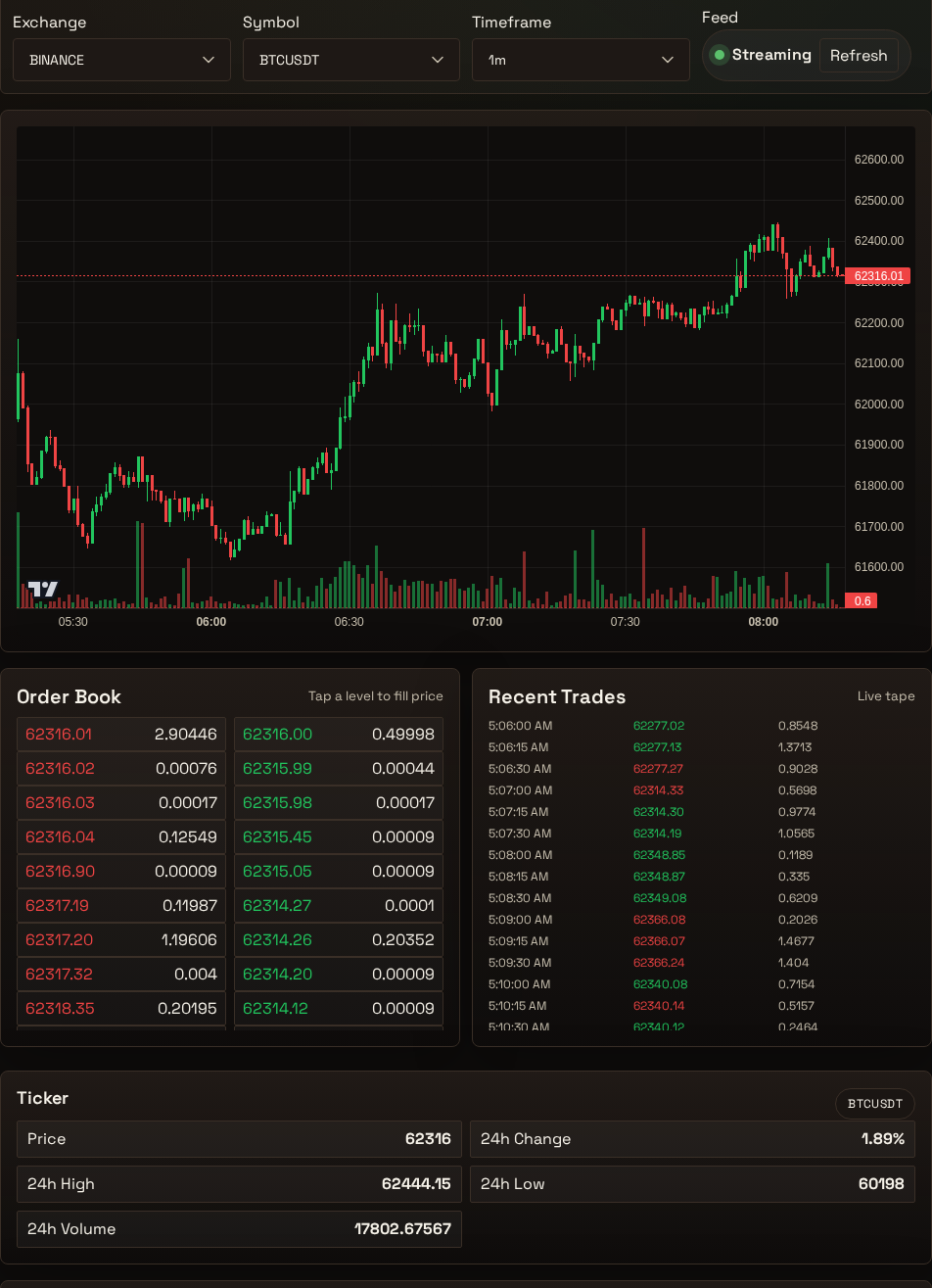
Open Trading in Gimmer when you need a current market read before you automate anything, not when you want the interface to tell you what the market will do next. Confirm the Feed state and Source first, then read Ticker, Order Book, and the Recent Trades panel together so the next decision comes from current context instead of guesswork.
Why This Route Matters Before Automation
Automation does not remove the need for current context. Before you adjust a strategy, run a paper-trading check, or decide that a quiet market should stay quiet, you still need a clear read of what the route is showing right now.
That is where Gimmer’s Trading route helps. The route gives you a visible set of market cues in one place: Feed, Source, Ticker, Order Book, Recent Trades, and the execution surfaces that follow them. The right use for that page is not prediction. It is orientation.
Treat it as a pre-decision surface. The goal is to understand whether the market looks active, one-sided, thin, or unsettled before you move to the next action.
Start With Feed State, Not With Action Buttons
The first question is simple: is the route currently showing a usable market read?
That is why the page’s visible Feed state and Source both matter. If the route is still syncing, or if the screen is showing simulated data, the safest move is to wait or switch workflows before you draw conclusions from the rest of the page. Only when the route is settled and the source is not simulated should you treat the rest of the screen as current market context.
This matters because the worst habit is to skip straight to execution controls before you confirm whether the market layer is ready to read.
Read Ticker, Order Book, and Recent Trades Together
No single widget should carry the whole decision. A useful read comes from looking at the visible cues together.
Ticker gives you the quick frame: current price, 24-hour change, high, low, and volume. It helps answer whether the market is broadly quiet, trending, or moving enough to deserve more attention.
Order Book adds depth. It shows whether nearby liquidity looks balanced or whether one side appears heavier than the other. That does not predict the next move, but it helps you see whether the immediate market looks crowded, thin, or uneven.
Recent Trades adds short-horizon activity cues on the route. It helps you see whether the panel is active and whether price and size updates are arriving, but you should not treat it as the exchange’s literal recent tape or as a standalone execution signal.
Read those elements together and you get a more practical answer than any one card can give by itself.
Keep Execution Profile Separate From Observation
The page also shows Execution Profile, Order Entry, and Basket Trader. That is useful, but it should not change the reading order.
Start with observation first. Use the market layer to understand what is happening. Only after that should you decide whether the next step belongs in paper-trading validation, further review, or a separate strategy workflow.
That separation matters because a route with execution controls can tempt you to act before the current context is clear. The safer habit is to let the market read come first.
What This Page Can And Cannot Tell You
Used carefully, the Trading route can help you answer a modest but important question: what is this route showing right now, and is that context clear enough to justify another action?
What it cannot do is guarantee that the next action will work. A visible market read is not a promise of profit, a forecast, or a substitute for broader strategy validation. It is one decision input.
That is the trust boundary worth keeping. Gimmer should help you read the current state more clearly without pretending to remove uncertainty from trading.
A Practical Reading Routine
A calm routine for this route can stay small:
- Open Trading when you need a current market read before an action.
- Check the visible Feed state and Source before you trust the rest of the route.
- Use Ticker for the broad frame, Order Book for nearby depth, and Recent Trades for short-horizon activity cues on the route.
- Keep Execution Profile, Order Entry, and Basket Trader as the second step, not the first.
- If the context still looks unclear, move to more validation before you automate anything.
That routine is deliberately conservative. It helps you use the route as a market-context tool instead of letting the presence of action buttons rush the process.
Final Thoughts
Gimmer’s Trading route is most useful when you ask it to do the job it actually supports today: give you a clearer read of current market context before you act.
Confirm the feed state and source first. Read Ticker, Order Book, and the Recent Trades panel together. Keep execution separate from observation until the context is clear enough to justify the next move. That is how the route stays practical without drifting into hype.
On your next market check inside Gimmer, open Trading, confirm the feed state and source first, read Ticker, Order Book, and the Recent Trades panel together, and only then decide whether the next move belongs in paper-trading validation, further review, or a strategy workflow.
— The Gimmer Team