
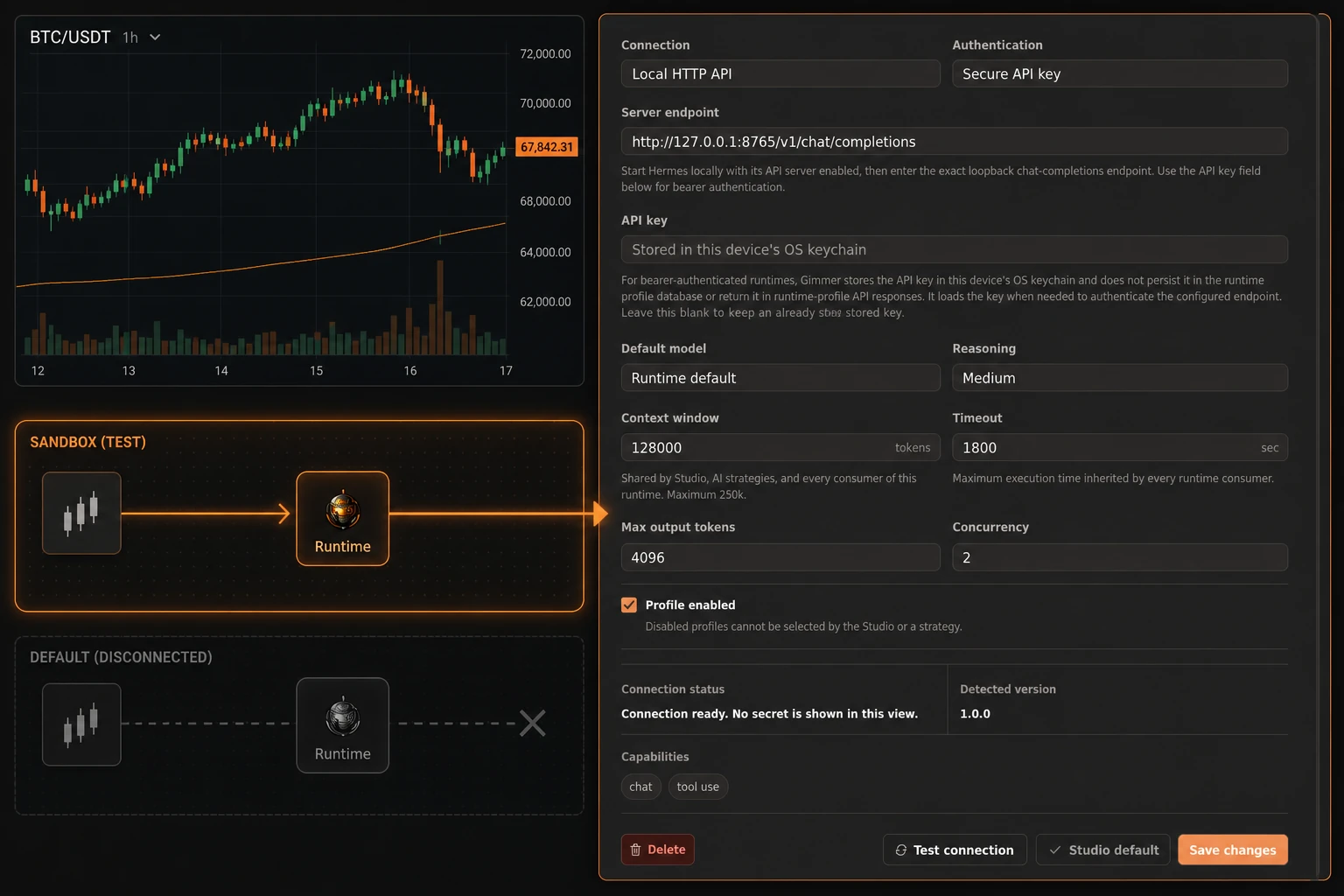
When you work on crypto strategy design or crypto trading automation, an AI runtime should be treated as a configuration you can inspect—not as a promise about what a model will produce. Gimmer’s AI Runtimes settings help you record the runtime profile used by Strategy Studio and AI-strategy workflows, run a narrow connection check, and decide whether the profile should be a starting preference for a new Studio conversation.
The useful workflow is deliberately practical: configure the profile you actually operate, test the configured executable or endpoint, read the returned health state and diagnostic message, and keep the result within its evidence boundary. A Ready state is a bounded connection signal. It is not a forecast, a model-quality score, or a trading decision.
1. Start with the runtime profile
Open Settings → AI Runtimes and create or select a profile. The profile records the runtime type, transport, endpoint or executable, authentication mode, model and limit fields, capability settings, and whether the profile is enabled.
The visible runtime choices are Codex, OpenCode, Hermes, and Custom server. The profile contract also declares runtime-specific transport values such as local, stdio, acp, http, and websocket. These values should not be read as a universal compatibility matrix: choose the combination that matches the runtime you actually operate and validate it with the product’s current fields.
This is a configuration step for Strategy Studio and AI-strategy paths. It does not create a strategy, start a conversation, or execute a crypto trading bot.
2. Fill in the endpoint, executable, and authentication fields carefully
Give the profile a clear name, then review the runtime, transport, endpoint or executable, authentication, model or reasoning settings, context and timeout limits, output and concurrency limits, capabilities, and enabled state. Treat these as the profile’s configuration record, not as universal guarantees about a provider or model.
For a network runtime, use an endpoint that is credential-free and controlled by you or explicitly trusted. Enter any bearer key only in the password field. Never place credentials in a URL, query string, fragment, prompt, screenshot, export, or support message. The UI states that a bearer key is stored in this device’s OS keychain and loaded when needed; that statement does not make a remote endpoint trusted or prove what a later model session will do.
For a local CLI runtime, use the runtime’s normal local login flow where applicable. The executable check identifies the CLI, but local authentication is checked when a session starts. Keep that distinction visible when you review a profile for a blockchain or cryptocurrency workflow.
3. Save the profile, then run Test connection
Save the profile before selecting Test connection. The test is a recommended diagnostic review step, not an enforced prerequisite for selecting a Studio default.
For local or process profiles, Gimmer runs the configured executable with --version and records the CLI response. For network profiles, Gimmer issues an HTTP GET probe; the Hermes path probes /health. The resulting state and message are limited to the configuration, reachability, and—in the cases surfaced by the response—authentication signal that the probe can observe.
Read the message as carefully as the label. Ready means that this narrow check met its condition. It is not proof of model quality, chat-completions compatibility, performance, reliability, execution readiness, fallback behavior, remote-server trust, exchange behavior, or any trading outcome.
4. Use the health state to choose the next safe check
The current health states give you a more useful next question than a generic success or failure message:
- Not tested means that no connection test has been recorded yet.
- Ready means that the bounded check succeeded; review the diagnostic message and keep its scope narrow.
- Needs login points to a missing credential or a 401/403 response that needs the runtime’s normal authentication path.
- Offline points to an executable or network failure, or to a server error that needs investigation.
- Misconfigured points to an invalid profile, endpoint, or executable configuration.
- Disabled means the profile is not selectable until it is enabled.
None of these states is a guarantee about a later session. A passing probe can become stale, and a session can expose a different problem once it actually starts. Use the state to decide what to inspect next rather than stretching it into a broader reliability or execution claim.
5. Make the Studio default a deliberate starting preference
After a profile is enabled and its diagnostic state is understood, you can use Studio default to set a user-scoped starting preference. That preference seeds a new AI Studio conversation and can prefill a new AI strategy configuration when no profile is already selected.
Setting the default does not start or execute a strategy. It also does not turn the connection test into a trading signal, guarantee a later runtime session, or define every future selection behavior. Disabled profiles cannot be selected as the default.
If you are moving from an AI runtime check into a crypto strategy or blockchain-related workflow, keep the handoff explicit: confirm which profile is selected, open the new Studio conversation or configuration, and review the generated or configured content before deciding what to do next.
A practical AI runtime checklist
- Does the profile match the runtime you actually operate?
- Is the endpoint or executable entered without credentials in the URL, query string, or fragment?
- Does the authentication choice match the runtime’s normal flow?
- Is any bearer key entered only in the password field and kept out of prompts, screenshots, exports, and support messages?
- Is the endpoint credential-free and controlled by you or explicitly trusted?
- Is the profile enabled?
- Did you run Test connection and read both the health state and diagnostic message?
- Do you understand the Studio default as a starting preference rather than a trading, performance, security, or execution signal?
Conclusion
AI runtime configuration is most useful when it makes the next step clearer. Record the runtime you intend to operate, keep credentials inside the approved input boundary, run the narrow connection test, interpret the health state, and set a Studio default only as a deliberate starting preference. That review path supports careful AI crypto strategy work without confusing configuration evidence with model quality, live execution, or future market results.
To begin, open Settings → AI Runtimes, create or select one profile, save it, run Test connection, and read the diagnostic message before choosing whether it should seed a new Strategy Studio conversation.