
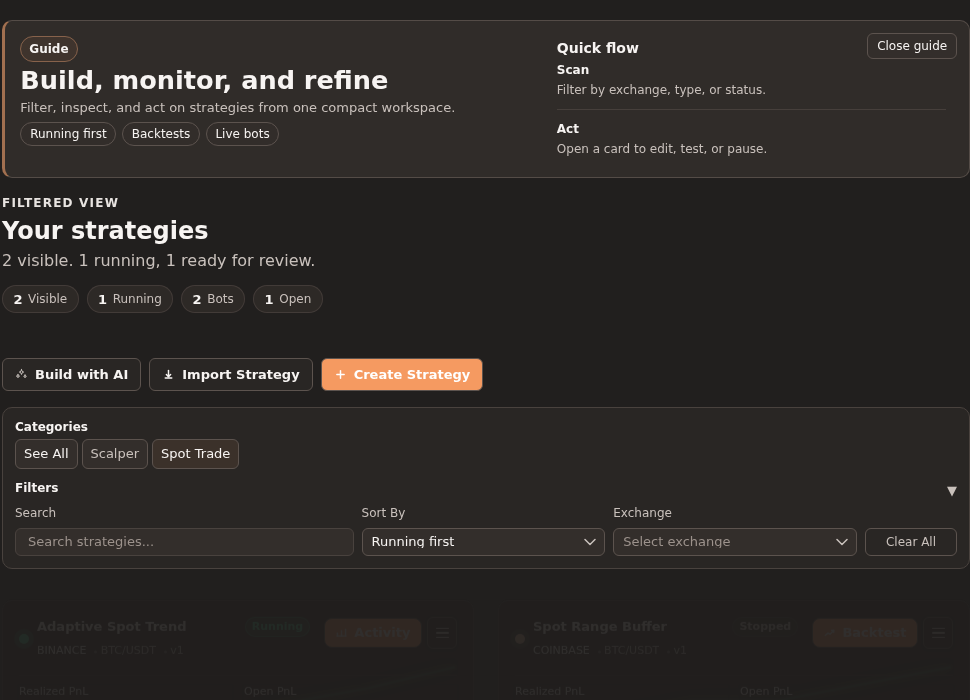
Strategy cards are useful only when you are comparing the right set of records. If you start with every automated trading strategy in the same view, the loudest metric can pull attention away from the question you meant to answer. Gimmer’s strategy workspace gives operators a smaller first step: filter the list, read the visible summary, then compare the strategy cards that still belong in the decision.
This article is about triage before comparison. It is not trading advice, and it is not a claim that filters can prove which crypto trading bot, exchange strategy, or automation setup will perform best. Filters help you make the list smaller and more relevant before you inspect the cards in detail.
Start With The Workspace Question
Gimmer’s strategy workspace is framed around a compact sequence: Build, monitor, and refine. The route guide describes the job plainly: Filter, inspect, and act on strategies from one compact workspace.
That order matters. Filtering comes before inspection because the first question is not “Which strategy card has the strongest-looking number?” The first question is usually simpler: which saved strategies belong in the comparison at all?
If you are reviewing a large strategy list, define the comparison before you read the cards. Are you looking for running strategies, recently updated drafts, a strategy type such as spot, or strategies connected to a specific exchange? That framing keeps the list tied to the operational decision instead of turning the board into a generic scoreboard.
Use Category Filters To Narrow The Strategy Type
The category controls are a useful first pass when your question is about strategy type.
If you want to compare a specific kind of crypto trading strategy, start there. A category filter reduces the visible set before individual names, metrics, or action buttons compete for attention. That does not validate the strategies. It simply keeps unlike records from being compared too early.
Use See All when the category view becomes too narrow. A cleared category state is not a step backward; it is a way to return to the full strategy board when the comparison needs to widen again.
Search When You Already Know The Record You Need
Search is the fastest control when the task starts with a known strategy name or naming pattern.
Gimmer’s filter panel includes a Search field for the strategy list. Use it when you are trying to find a specific saved strategy, a naming convention, or a smaller group of related records. That is a different task from browsing the whole workspace.
A good search habit keeps the next step honest. If the search returns one visible card, inspect that card as the likely target. If it returns several cards, compare only those records first. If it returns none, clear the search before you assume the strategy is missing from every context.
Sort For Review Order, Not A Prediction
Sorting changes the reading order. It does not predict future trading results.
The strategy workspace supports sort options such as Running first, Last updated, Performance, Name (A-Z), and Name (Z-A). Each one answers a different review question:
- Running first helps you start with strategies that are already active.
- Last updated helps when the newest configuration work is the priority.
- Performance changes the list order, but it should not be read as a promise of future results.
- Name (A-Z) and Name (Z-A) help when the board is organized by naming conventions.
That distinction protects the reader. Sorting by performance can be useful for review order, but it is not a shortcut around backtesting, activity review, exchange readiness, or risk checks.
Use Exchange Filtering To Keep Market Context Separate
Exchange context can change the kind of review you need.
The filter panel includes an Exchange selector. Use it when the strategy comparison should stay inside one exchange context rather than mixing records that may have different market, credential, or routing considerations.
This is a list-control step, not a readiness claim. Filtering by exchange does not prove that credentials are present, that a wallet is funded, or that live activity is ready. It only keeps the visible strategy set aligned with the exchange context you are currently reviewing.
Read The Visible Summary Before The Cards
After filters are active, Gimmer’s command strip changes the frame from a broad workspace to a Filtered view. It also summarizes the visible set with counts such as Visible, Running, Bots, and Open.
Those counts are useful because they keep the comparison grounded. If a filter leaves a small number of visible cards, the next step can be card-by-card review. If the filtered set still has many running strategies or open positions, the operator may need another narrowing pass before opening a specific card.
Read the summary as a scope check. It tells you how much of the strategy board is still in the decision.
Then Compare The Remaining Strategy Cards
Once the list is smaller, strategy cards become more useful.
At that point, compare the remaining cards for the job in front of you: status, active bots, open positions, last update context, available actions, or whether the next step belongs in the builder, backtest, activity, publish, or start-preflight flow. The filter step does not replace those deeper checks. It makes them less noisy.
This is especially important in trading automation. A crypto bot card can contain real operational signals, but those signals should be read in the right context. A filtered board helps you keep that context visible before a single metric becomes too persuasive.
What Strategy Filters Do Not Prove
Filters are helpful because they are modest. They should stay that way.
- They do not prove that a strategy is profitable.
- They do not prove that a trading bot is safe to run live.
- They do not replace backtesting or activity review.
- They do not confirm exchange API key readiness.
- They do not confirm wallet funding or market availability.
- They do not turn past performance into a future-result claim.
Those limits are part of the workflow. Use filters to make the board readable, then use the appropriate strategy, backtest, activity, exchange, and wallet surfaces for the deeper decision.
A Practical Filter-First Routine
When the strategy list feels too broad, keep the routine simple:
- Open the strategy workspace and define the question you are trying to answer.
- Use category controls when the comparison is about strategy type.
- Use search when you already know the strategy name or naming pattern.
- Use exchange filtering when market context matters.
- Choose a sort order that matches the review task, not a prediction.
- Read the visible summary before opening individual cards.
- Compare only the remaining strategy cards, then move into the specific next workflow that owns the decision.
Final Thoughts
A good filter habit does not make trading automation risk-free. It makes the review smaller and clearer.
Gimmer’s strategy workspace gives operators a practical first step before card comparison: narrow the visible set, read the summary, and then inspect the strategy cards that still belong to the decision. That keeps automated trading, crypto strategy review, exchange context, and bot operations from collapsing into one noisy board.
Filter the strategy workspace first, reduce the visible set, and compare only the strategy cards that still belong to the decision you are making.
– The Gimmer Team