
Choosing a strategy type is only the first step. The next useful boundary in Gimmer is the strategy builder itself, where the product lets you name the strategy, choose the current market inputs, configure the logic that belongs to that type, and then use Save Strategy to turn the setup into a draft before you treat any later step as the next move.
Why The Saved-Draft Step Matters
It is easy to think about strategy work as if the important decisions only begin at backtests, activity, or marketplace publishing. In practice, the builder already does something useful before any of that: it turns a chosen strategy path into a named draft you can revisit.
That distinction matters because a draft is not the same thing as a live-ready strategy. A draft is the point where the configuration becomes concrete enough to save, review, revise, and return to without pretending the later workflow has already been proved.
What Changes After Strategy Selection
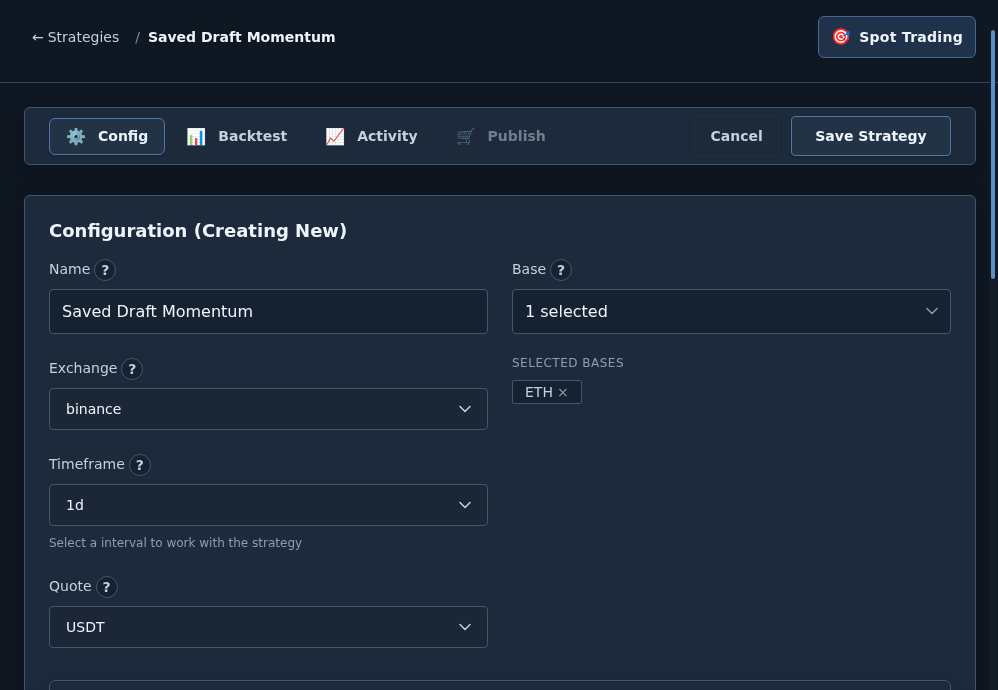
Once you enter #/strategies/builder/{type}, the page stops being a route-choice surface and starts acting like a working configuration surface. The builder header keeps the strategy context visible, the breadcrumb gives you a clean way back to #/strategies/select, and the tabs show where the current workflow can go next.
In the builder flow this article covers, the page exposes Config, Backtest, and Activity immediately. It also shows Publish, but that tab stays disabled until the strategy has a real id. That is one reason the draft step matters: saving is what turns the setup into a named record instead of a temporary screen state.
Read The Config Tab As The Draft Surface
The current builder starts from Config, and that is the right place to treat as the draft surface.
On the standard Config surface, the visible labels start with Name, Exchange, Timeframe, Quote, and Base. Portfolio uses a dedicated allocation-focused configuration panel instead of that exact field set. In either case, the draft step is where the strategy gets a recognizable identity and market context before later tabs matter.
This is also where the builder makes the setup more specific than the earlier route-selection step. You are no longer only deciding which kind of strategy to enter. You are shaping the current version of the strategy you may want to revisit later.
Different Strategy Types Expose Different Draft Inputs
The builder does not treat every strategy type as identical, and the article should not pretend otherwise.
Script strategies expose a Code editor section. Some builder paths also expose Indicators, including separate Available Indicators and Selected Indicators panels. Portfolio strategies use a dedicated configuration surface instead of the standard config tab flow. The common thread is not that every strategy looks the same. The common thread is that the builder gives each type a place to become a saved draft before later steps take over.
Use Save Strategy As The Boundary
The most useful operator habit on this page is simple: treat Save Strategy as the moment when the setup stops being temporary.
In the current builder flow, saving sends the configuration through the strategy API and returns the saved strategy id and name. That saved id is also what makes the Publish tab eligible to unlock. Public copy should describe that boundary carefully: saving creates a draft record. It does not prove that the strategy has been backtested well, started safely, or approved for the marketplace.
What A Saved Draft Does Not Prove
A saved draft is useful, but it is not a shortcut around later decisions.
It does not guarantee that a backtest will look healthy. It does not guarantee that a live start will succeed. It does not guarantee that a publish path is complete or appropriate. It only proves that the current builder state has been captured as a strategy record you can revisit.
That is exactly why this step deserves its own article. It helps the operator build in the right order: capture the draft first, then decide what deserves deeper validation next.
A Practical Draft-First Routine
A calm workflow in the current builder looks like this:
- Enter the strategy builder from the strategy-selection route you actually chose.
- Fill the visible configuration fields that define the draft, whether that is the standard name, exchange, timeframe, quote, and base flow or the portfolio allocation panel.
- Complete the type-specific sections that belong to that strategy path, such as indicators, the script editor, or portfolio allocations.
- Use Save Strategy before you assume the configuration is ready for later steps.
- Only after the draft exists should you decide whether the next useful checkpoint is backtest review, activity inspection, or marketplace publishing.
That routine stays conservative on purpose. It helps the operator capture work without overstating what the current state proves.
Final Thoughts
Some of the most trustworthy product habits are small ones. Not every strategy decision needs to begin with a prediction about results. Sometimes the right next step is simply creating a draft you can name, revisit, and review honestly.
In Gimmer, the strategy builder is that checkpoint. Use the current config surface to capture the draft first, let Save Strategy create the reusable record, and only then decide which later tab deserves your attention.
Open the strategy builder, fill the current configuration fields, and use Save Strategy to create a named draft before you move on to backtests, activity review, or marketplace publishing.
— The Gimmer Team