
Before you export anything from Gimmer’s current Wallet Access surface, refresh the wallet summary, choose the smallest export that matches your immediate need, and treat Reveal Private Key as a high-sensitivity last resort that requires an explicit confirmation step.
Why This Route Needs A Calmer Reading Order
Sensitive wallet actions become risky when they are treated like routine housekeeping. A signed-in operator can see summary data, export buttons, a password field, and a reveal action on one page, then move too quickly because all of those controls appear to belong to the same task.
Gimmer’s current Wallet Access surface is useful because it slows that decision down. It gives the operator a visible summary first, then three different export paths, and finally an explicit consequence checkpoint before any private-key reveal call should continue. The value here is not urgency. The value is a better order of operations.
Start With Wallet Summary, Not With Export Buttons
The route is strongest when you read it from the top. Start with Wallet Summary.
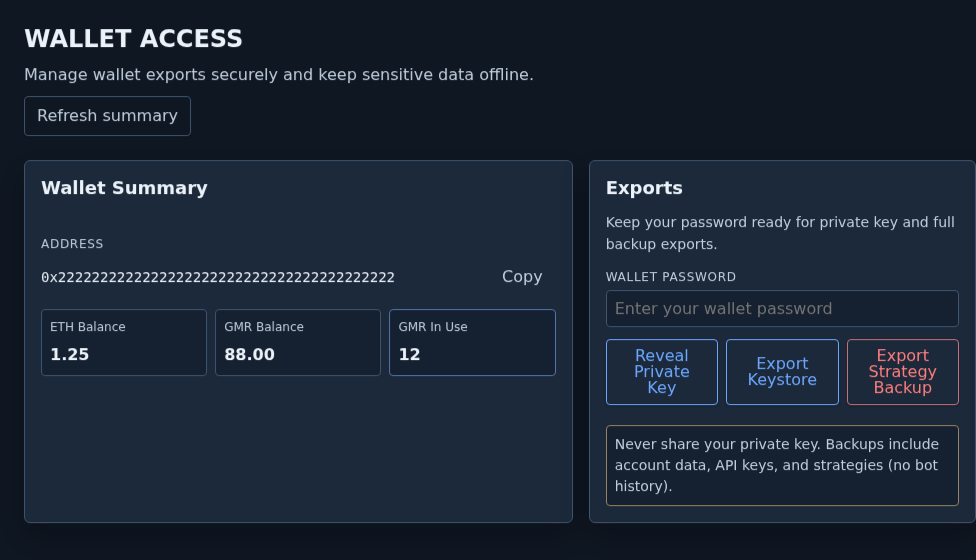
The current summary shows the wallet address, ETH Balance, GMR Balance, and GMR In Use. It also gives you a visible Refresh summary action. That matters because the safest next decision depends on current context. If the wallet summary is stale, you can make the wrong export choice before you even know what state the route is trying to describe.
That is why the first useful habit on this page is simple: refresh the summary, read what is actually on screen, and only then decide whether you need any export action at all.
Use The Exports Panel To Choose The Smallest Action You Need
After the summary, move into Exports. The important detail here is that the route does not expose one generic export action. It exposes three different choices: Reveal Private Key, Export Keystore, and Export Strategy Backup.
The panel also sets a boundary before you click anything. Its current subtitle groups the password-gated actions together, while the buttons stay more specific: Reveal Private Key and Export Strategy Backup. That makes the keystore path visibly different from the two higher-sensitivity actions even before the operator chooses one.
That difference should shape how you read the page. If the route offers multiple export actions, the public lesson is not “export everything.” The public lesson is “pick the smallest action that matches the immediate need.”
That keeps the article honest. A signed-in operator may only need to refresh the summary and stop. Another operator may need a keystore file. Another may need Export Strategy Backup. Those are not the same decision, and the route is more trustworthy when the article preserves that difference instead of flattening everything into one routine.
Keep The Wallet Password Boundary Literal
The Exports card also exposes a visible Wallet password field. Read that boundary literally.
In the current route, the password is not decorative. It is part of the decision boundary for the password-gated private-key and strategy-backup paths on the page. If you try to reveal a private key without entering the password, the route can answer with Wallet password is required. The same public lesson should stay narrow: the page is asking for deliberate local confirmation before a higher-sensitivity action continues.
That does not turn the route into a security guarantee. It does make the decision boundary visible, which is the useful public fact.
Private-Key Reveal Is The Last And Most Sensitive Step
The most important claim boundary in this article is the private-key reveal path.
When the operator presses Reveal Private Key with a password present, the route does not jump straight to a revealed secret. It opens an inline checkpoint: Confirm private key reveal. The current copy warns that revealing the key grants full wallet control and should continue only on a trusted device with immediate offline storage.
That checkpoint is the line the article should preserve. The public meaning is not “private-key reveal is convenient.” The public meaning is “private-key reveal is exceptional enough that the route stops and asks again before it proceeds.”
That is also why Reveal Private Key should be treated as the last step on this page, not as a normal opening move. If your need can be satisfied by summary review or a narrower export, stop there instead of escalating to the highest-sensitivity action.
Export Keystore And Export Strategy Backup Are Not The Same Thing
The route also separates Export Keystore from Export Strategy Backup. That separation matters because it tells the reader that these actions are not interchangeable.
The page itself reinforces that point with a warning: Never share your private key. Backups include account data, API keys, and strategies (no bot history). That warning is useful public guidance because it tells the operator that Export Strategy Backup contains more than one kind of material. The right lesson is not to export more by default. The right lesson is to choose the smallest export that solves the immediate problem.
When an export contains more context, the discipline should increase with it.
What This Route Does Not Prove
This article should stay narrow about what the current page can and cannot claim.
- It does not prove account recovery is fully validated.
- It does not prove the wallet is ready for live trading or funding workflows.
- It does not make private-key reveal a normal maintenance task.
- It does not mean every operator should use Export Strategy Backup every time they open the route.
- It does not replace careful offline storage discipline or later security review.
The page is useful because it makes the available actions visible and distinct. It becomes unsafe only when a reader collapses those distinctions into one habit.
A Practical Decision Routine Inside Wallet Access
A calmer routine can stay simple:
- Open Wallet Access and refresh Wallet Summary.
- Read the current address and balances before deciding whether an export is needed.
- If an export is needed, choose the smallest action that matches the immediate purpose.
- Keep Reveal Private Key as the last and most sensitive option on the page.
- If the route opens Confirm private key reveal, stop and treat that warning literally before you continue.
- Never use screenshots, support notes, or copied text to normalize a revealed secret or a filled password field.
Final Thoughts
Good wallet discipline often starts with one quiet habit: do not treat every export path as if it belongs to the same job.
That is the most useful way to read Gimmer’s current Wallet Access surface today. Refresh the summary first. Choose the smallest export second. Keep private-key reveal behind its explicit checkpoint and reserve it for the rare cases that actually require it.
Open Gimmer, refresh Wallet Summary, decide whether you need Export Keystore, Export Strategy Backup, or no export at all, and treat Reveal Private Key as the last and most sensitive action on the page.
— The Gimmer Team