
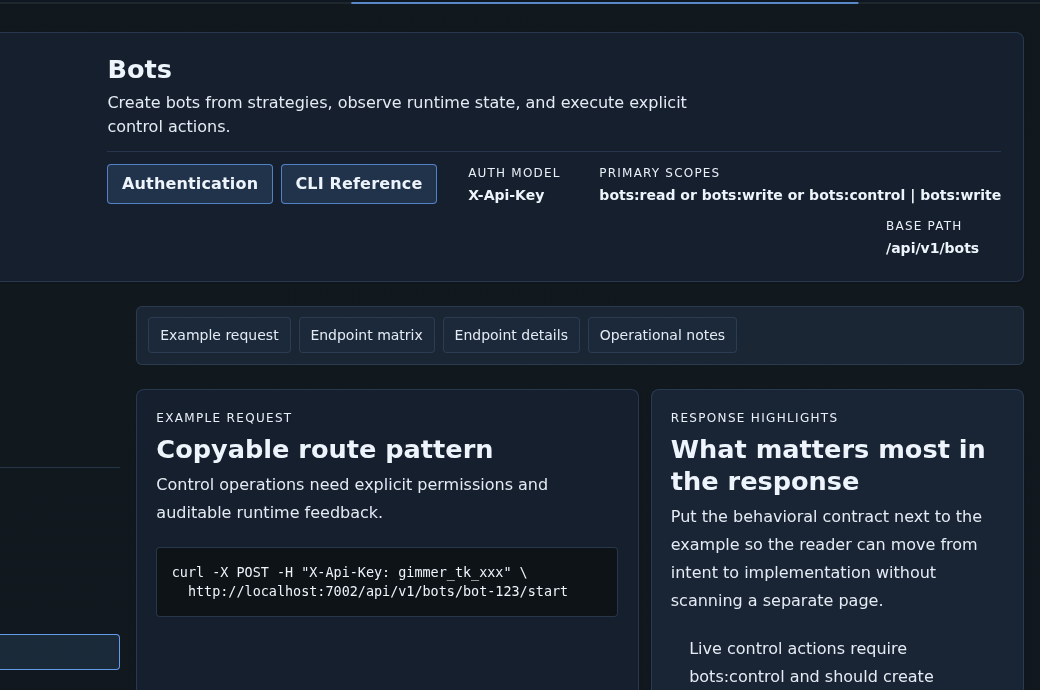
Bot automation gets riskier when the contract stays fuzzy. Before you wire a start or stop workflow in Gimmer, use the current docs route to confirm the auth model, the control scope boundary, the bot endpoint family, and the confirmation path the product expects after a lifecycle action is accepted.
Why A Bot-Control Workflow Should Start In Docs, Not In A Script
The fragile part of automation is often not the request itself. It is the assumption that the caller already understands the contract behind that request.
That is why Gimmer’s current Docs route matters for bot-control work. It gives the operator a quieter place to confirm what kind of access model applies, which scope boundary matters, which routes belong to the bot family, and what kind of confirmation path should follow a write-side action.
That is a better starting habit than jumping straight from a token name or copied endpoint into a live control script.
What The Docs Route Shows Today
The current docs route keeps the key chapters in one place: Authentication, Scopes, Bots, SSE Events, and Examples. For a control workflow, that grouping is useful because the route does not isolate one request from the rest of the contract. It keeps permissions, route family, and follow-up confirmation logic together.
The auth model is explicit. The docs route tells readers to use scoped API tokens in X-Api-Key for public v1 routes. It also keeps scope rules visible instead of assuming a caller will infer them from the endpoint name alone.
That makes the route a practical preflight surface for anyone about to automate bot lifecycle actions.
Read The Scope Matrix Before You Read The Control Route
If the goal is to automate a bot start or stop path, the first useful checkpoint is not the sample curl. It is the scope matrix.
The current docs surface lists bots:read, bots:write, and bots:control, then makes the key rule explicit: bots:control is required for start, stop, end, pause, and resume operations.
That matters because it keeps permission failures legible before the script exists. The operator can see that reading bot state, changing configuration, and controlling lifecycle transitions are not the same permission envelope.
That is the right public lesson here. Start with the documented boundary, then build the automation around it. Do not discover the missing scope only after the workflow is already wired into a job runner.
Use The Bots Chapter As A Control Checklist
Once the scope boundary is clear, move into the Bots chapter and read the route family in order.
The current docs route lists the bot inventory and detail paths, the bot creation path, and the explicit control routes: POST /api/v1/bots/{id}/start, POST /api/v1/bots/{id}/stop, and POST /api/v1/bots/{id}/end. It also keeps nearby read routes for positions, performance, chart, and events.
That route family is useful because it keeps the control action inside a broader operating picture. A script that can start or stop a bot should also be designed with a clear view of how the caller reads state, inspects follow-up behavior, and verifies what changed afterward.
The docs notes reinforce that posture by saying live trading requires bots:control and an explicit confirmation flow before execution starts.
Treat Permission Failures And Realtime Feedback As Part Of The Workflow
One of the more trustworthy parts of the current docs route is that it does not hide failure behavior. The error guidance makes room for 401 and 403 outcomes, and the route ties insufficient permissions directly to missing write or control scope.
That is not decoration. It is part of the operating contract. A bot-control automation path should expect permission failures to be explicit and actionable, not something the caller retries blindly until the request happens to pass.
The same is true for confirmation behavior. The docs route keeps SSE Events and realtime guidance nearby because long-running or stateful workflows should not end at the first accepted write response. For bot-control readers, that means the important question is not only whether the route can accept a start or stop action, but also how the caller verifies what happened next.
The route says create, start, stop, and end operations must generate auditable events and realtime confirmations. Read that as a verification rule before automation, not as a promise that any external script is ready for unattended use.
A Practical Preflight Before You Automate Start Or Stop
A short preflight keeps the docs route useful without turning it into a guarantee surface:
- Open Docs and confirm the versioned public auth model uses
X-Api-Key. - Open Scopes and verify whether the workflow needs bots:read, bots:write, or bots:control.
- Open Bots and read the list, detail, and control routes in one pass before you automate the write-side call.
- Use the visible Examples section to sanity-check the shape of a start request without treating the snippet as full production guidance.
- Keep the permission-failure path and realtime confirmation path in view before you treat the workflow as ready for a smoke test.
What This Article Is Not Claiming
This is not a claim that every operator should automate bot controls. It is not a promise that reading one docs chapter makes a control script safe. It is not a claim that any external scheduler, runner, or integration host is production-ready just because the docs route lists the endpoints clearly.
It is also not a docs-workspace handbook tour, a personal-token issuance tutorial, or a guide to exchange credential entry, strategy design, or trading outcomes. The article is narrower than that. It is about using the current docs route to verify the control contract before automation touches live bot state.
Final Thoughts
Good automation starts with clearer boundaries, not with louder confidence. Gimmer’s current docs route helps technical operators confirm the auth model, permission boundary, control endpoints, and follow-up confirmation path before they wire a lifecycle script.
That is the useful public framing for this surface. Read the contract first. Let the scope and confirmation rules slow you down. Treat the docs route as a preflight for automation, not as a shortcut around review.
Open Gimmer, go to Docs, confirm X-Api-Key, review Scopes, open Bots, verify the control endpoints and bots:control rule, and pair any write-side automation with the documented realtime confirmation path before you run it.
— The Gimmer Team