
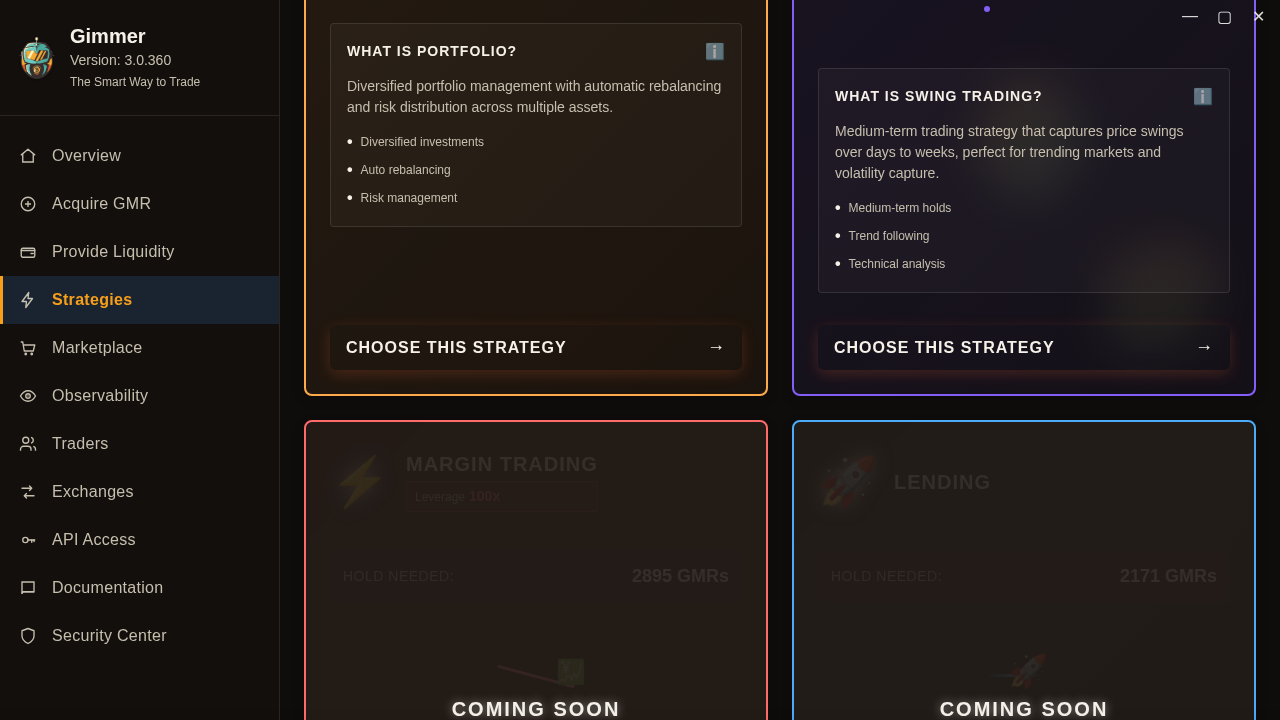
Before you build a bot in Gimmer, pause on the Strategy Selection page. The page already separates the paths you can enter today from the cards still blocked by Coming soon, so the better first move is choosing inside that visible boundary instead of guessing from older roadmap-era language.
Why This Page Matters Before You Build Anything
Not every automation decision should begin inside a builder. Sometimes the first question is simpler: which strategy paths are actually open to me right now?
That is what the Strategy Selection page answers. It gives the operator a current route-level view before any builder workflow starts, which makes it a better first checkpoint than memory, older launch language, or assumptions based on which cards happen to be visible in the grid.
This is also why the page is useful as guidance. It is not trying to predict outcomes. It is helping the operator stay inside the paths that are visibly available today.
Start With The Cards You Can Actually Choose
The first boundary to read is simple: which cards expose Choose This Strategy, and which ones do not?
On the current page, the selectable paths are Spot Trading, Code Editor (Script), Portfolio, and Swing Trade. Those are the paths the selector currently lets you enter from this route.
That does not mean one of those paths is automatically the best choice. It means they are the paths the product currently exposes as selectable here, and that is the right place to start the decision.
Use The Page As A Routing Step, Not A Recommendation Engine
A good habit on this page is to read it as a routing surface rather than a ranking surface.
The job of the page is not to tell you which strategy will perform better. Its job is to show you which workflow you can enter, what each available path is called, and when the product is telling you not to proceed because the card is still outside the current shipped path.
That makes the page useful before any deeper work begins. You can choose a current path, or you can stop there and avoid building a plan around something the page is not actually offering today.
Treat Coming Soon As A Real Boundary
Some cards stay visible while still carrying a literal Coming soon overlay. That visibility matters, but not in the way hype copy often suggests.
On this route, a visible but dimmed card is not a hidden recommendation and not a soft promise that the workflow is ready. It is a boundary marker. The safe reading is straightforward: the card exists on the page, but it is not part of the current selectable path.
That is why the strategy-selection article has to stay conservative. The most useful public guidance is not speculation about unavailable cards. It is helping the operator recognize where the current route stops.
Read Hold Needed As Live Context
Each card also shows a Hold needed value. That detail is useful, but it should be read as live route context rather than frozen article copy.
The page loads those values dynamically, which means the practical lesson is not to memorize a number from a blog post. The practical lesson is to notice that the route gives you one more piece of decision context before you enter the next workflow.
In other words, the value helps you read the page more carefully. It should not be treated as a promise about cost, ranking, or suitability.
A Practical Strategy Selection Routine
A small routine keeps this page useful:
- Open the Strategy Selection page before you decide which builder path to enter.
- Stay with the cards that visibly expose Choose This Strategy.
- Read Coming soon as a stop sign, not as a hint to plan around an unavailable path.
- Use the card names, route copy, and live Hold needed context to understand the current workflow boundary before you continue.
- If the path you wanted is still unavailable, stop there instead of building assumptions into the next decision.
That routine is intentionally calm. It helps the operator make the first decision from the current product surface instead of from expectation.
What This Page Does Not Promise
The Strategy Selection page does not tell you which strategy will perform better. It does not promise that unavailable cards are close to release. It does not turn a visible card into proof of roadmap timing, production readiness, or safer trading outcomes.
What it does provide is a cleaner first read: which paths are selectable now, which ones are still blocked, and where the next workflow begins if you choose to continue.
Final Thoughts
Good operator discipline often starts with a small boundary check. Not which strategy sounds most ambitious? but which path is the product actually opening to me right now?
In Gimmer, the Strategy Selection page is a useful answer to that question. Read the current cards, stay with the paths you can choose today, and let the visible Coming soon boundary stop the decision before assumption takes over.
Before you build a bot in Gimmer, open Strategy Selection, stay with the cards you can choose today, and use the visible labels to decide whether Spot Trading, Code Editor (Script), Portfolio, or Swing Trade matches your next workflow.
— The Gimmer Team