
A useful API token workflow is less about speed than about boundaries. The important question is not whether you can generate a secret quickly. It is whether you can name who owns it, keep the scope narrow, move the secret immediately, and revoke it cleanly when the integration changes.
Why Shared Tokens Turn Small Integrations Into Bigger Risks
Most integration mistakes do not start with a dramatic failure. They start with a shortcut: one token reused across multiple jobs, scopes added because nobody wants to break an existing script, and no clear answer to who owns the credential when something changes.
That is why a personal API token workflow matters. The goal is not to make automation feel casual. The goal is to make each token attributable, narrow, and easy to revoke when the context changes.
What Gimmer Shows On The API Access Route Today
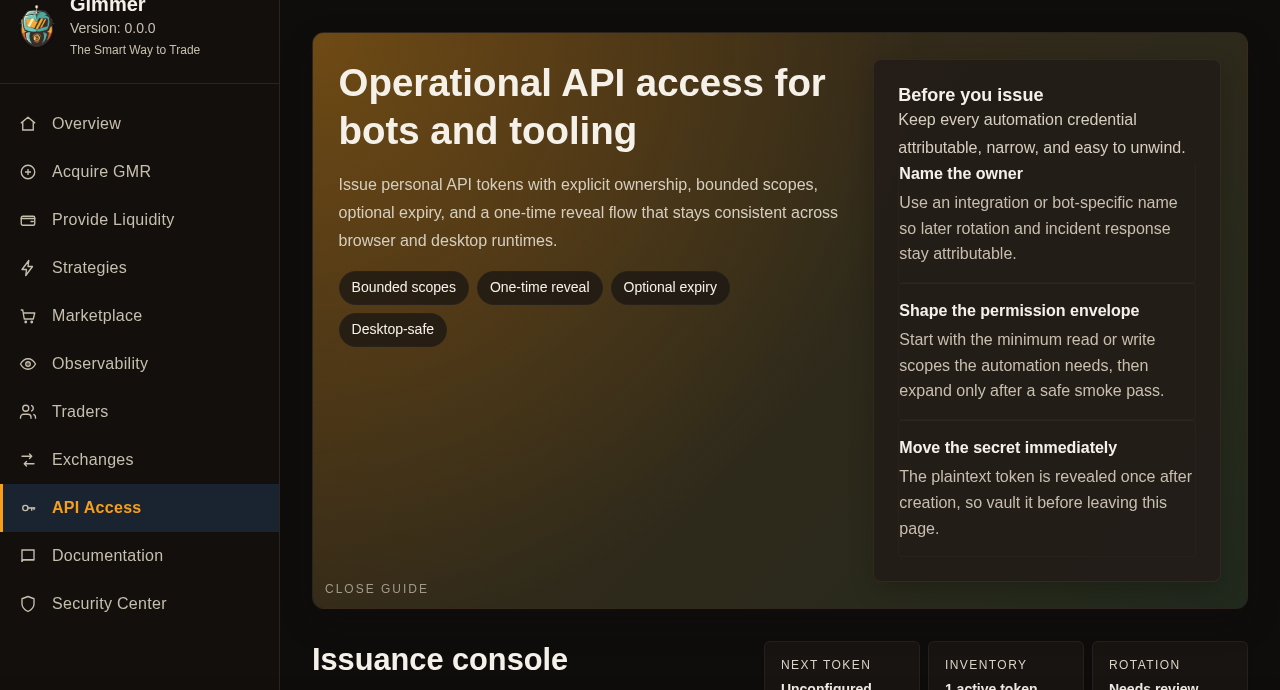
Gimmer’s current API Access route is useful because it keeps the workflow explicit. The page heading frames the surface as Operational API access for bots and tooling, which is the right posture for an integration page: practical, not promotional.
The setup guidance stays concrete. It asks the operator to Name the owner, Shape the permission envelope, and Move the secret immediately. That sequence matters because it forces the user to think about accountability, scope, and handoff before a token becomes another forgotten secret.
The same route also keeps the follow-through visible through sections such as Issuance console, One-time reveal, Live access posture, Release checklist, and Token inventory. After creation, that inventory stays on the safe metadata side of the workflow by showing the token prefix, scope envelope, expiry posture, and last-used state instead of replaying the plaintext secret.
Start With The Smallest Permission Envelope
The more conservative default for a new integration is not a broad capability set. It is a narrow first pass.
Gimmer’s own guardrails point in that direction: Prefer narrow scopes, then expand only after the first smoke flow proves what the integration actually needs. That is a better discipline than granting writes or control surfaces up front just because they might be useful later.
In practice, that means choosing the smallest scope set that can verify the path you care about, then widening the token only when the job has earned that authority.
Give Each Integration Its Own Token
One token per bot, CI job, dashboard, or internal tool is slower on day one, but much cleaner on day thirty.
When one token maps to one automation context, ownership stays clear. Rotation stays deliberate. Revocation stays surgical. If a script is retired or a workflow changes, you do not have to wonder which other system will break if the secret disappears.
That is why the route’s Do not reuse secrets guidance matters. It is not extra process. It is how an operator avoids turning one credential into a hidden dependency for half the stack.
Handle The One-Time Reveal Like A Real Credential Handoff
The route makes the boundary plain: the plaintext token is revealed once after creation. That should change the operator’s behavior immediately.
A one-time reveal is only useful if the secret moves directly into a password manager, CI secret store, or another deliberate vaulting path before the user leaves the page. The reveal itself is not the safety measure. The disciplined handoff is.
That also means the plaintext token should not be pasted into chat, tickets, screenshots, docs, or recorded demos. Once the secret leaves a controlled vaulting path, treat it as exposed and revoke and reissue it instead of forwarding it.
The same logic applies to expiry. Optional expiry is valuable because it gives an abandoned integration a cleaner end state, but it does not replace ownership or review. A forgotten token with no owner is still a bad habit even if it expires later.
Revocation Should Be Deliberate, Not Last-Minute
The route does not hide revocation as a cleanup detail. It keeps token inventory visible and shows a Revoked state when access is cut off. That matters because operators need to understand what changed, not just click away a secret and hope the dependency graph is obvious later.
A better habit is to plan the revocation path before the integration becomes routine. If a job is replaced, if scope needs to shrink, or if ownership changes hands, the operator should revoke the token deliberately and confirm the visible state change instead of letting the credential linger as a hidden dependency.
What This Workflow Is Not Claiming
This is not a promise that personal API tokens make integrations safe by default. It is not a claim that every workflow should use write scopes. It is not a claim that the token page removes the need for route-level review, documentation checks, or secret-handling discipline elsewhere.
It is also not a guide to OAuth application setup, and it is not a claim that Gimmer’s CLI uses this token model. This article is only about the personal tokens issued from the current API Access route.
It is a narrower claim: a controlled integration workflow makes scope, ownership, one-time handoff, prefix-only inventory, and revocation visible before the credential disappears into automation.
Final Thoughts
The right token workflow feels calmer than most automation marketing. One token. One owner. One narrow purpose. One deliberate handoff. One clear revocation path when the job changes.
That is a better standard than treating every new integration like it deserves an all-purpose secret from the start.
Want a more controlled first step for your next Gimmer integration? Open Gimmer, sign in, go to API Access, issue one dedicated token for one automation context, start with the smallest scopes that pass the first smoke test, vault the secret immediately, and plan rotation before you leave the page.
— The Gimmer Team