
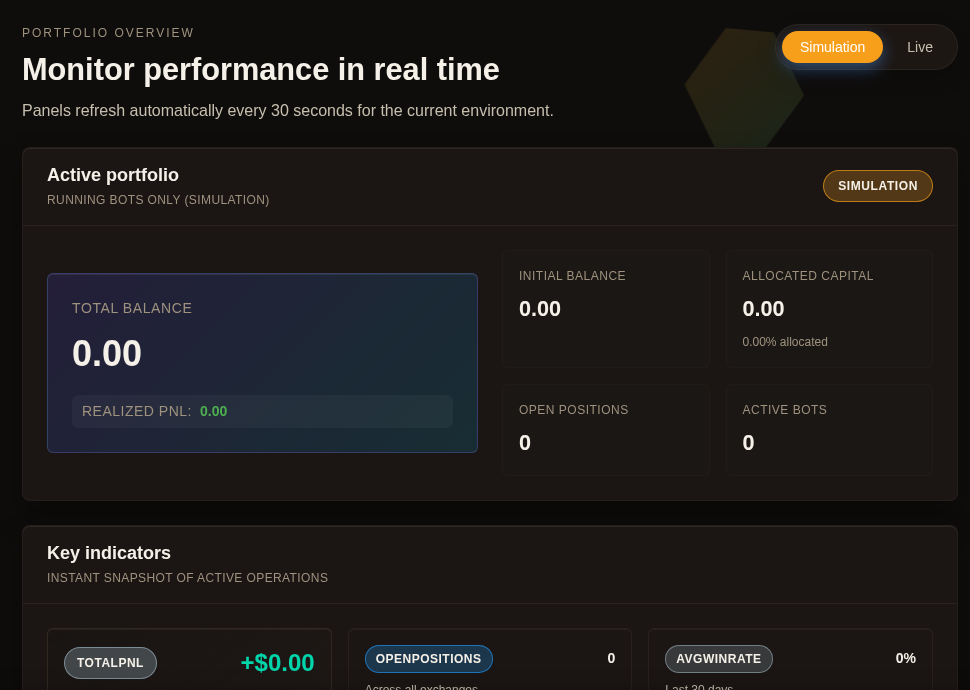
Most avoidable mistakes happen before the deeper route opens. They happen when a user reacts to one noisy number, one open position, or one uneasy feeling without first checking the selected environment’s active portfolio state in one place. Gimmer’s Overview route is useful because it gives that first pause a home. Open Overview, confirm the selected environment, and read five top-level signals in order.
Why Start On Overview Before You React
There is a difference between seeing activity and understanding context. A balance shift, a quiet strategy, or a negative line on a chart can create urgency faster than clarity.
The better habit is smaller. Open the Overview route first, confirm whether you are looking at Simulation or Live, and read the selected environment’s active portfolio state before you open a deeper route.
That is what makes the page useful. It does not tell you what action to take. It gives you a stable place to check the selected environment’s active portfolio state before you interpret anything else.
The Five Numbers Worth Checking First
The top of the current Overview route gives you five values that are more useful than jumping straight into a deeper tab.
- Total balance tells you the current size of the selected environment’s active portfolio.
- Realized PnL tells you what has already been closed in the selected environment’s active portfolio.
- Allocated capital tells you how much capital is already committed instead of still available.
- Open positions tells you how much is still in motion right now.
- Active bots tells you how many running automations are contributing to the current state.
Read together, those five values create a basic posture check. They help answer a simpler question before any deeper analysis: What is this route showing for the selected environment’s active portfolio, and how much is already in play?
Why The Environment Toggle Matters
The Overview route does not present one universal dashboard state. It gives you a visible choice between Simulation and Live. That matters because those two views are separate contexts and should not be read as one combined state.
If you skip that distinction, the rest of the page becomes easier to misread. A user can start interpreting a number emotionally before they confirm which environment the number belongs to.
The right order is quieter: choose the environment first, then read the five numbers, then decide whether you need a deeper route for more detail.
What The Rest Of The Page Adds
After the top-level check, the rest of the route helps confirm whether the story is consistent.
- Key indicators compress the current state into a quicker operational summary.
- Operational health adds percentage-style gauges for the selected environment.
- Daily portfolio evolution and Cumulative growth (realized PnL) give trend context when enough history exists.
- Running strategies lets you see whether the top-level numbers line up with the strategies that are currently active.
That sequence is useful because it keeps the route honest. Start broad, then confirm the pattern, then open a deeper surface when you need more detail about one part of that state.
What These Numbers Do Not Tell You
Good dashboard habits depend on knowing the boundary. The Overview route does not diagnose root cause or prescribe the next step.
If a number looks unusual, the dashboard gives you context first, not a final diagnosis.
That is why the healthiest reading of the page is operational instead of emotional. Treat it as a first check, not as a recommendation engine.
A Practical Routine To Keep
A useful Overview habit can stay very small.
- Open Overview at the start of the check.
- Confirm whether you are in Simulation or Live.
- Read Total balance, Realized PnL, Allocated capital, Open positions, and Active bots in the same order every time.
- Use the supporting panels only to confirm the story, not to force a quick conclusion.
- Only then move into the deeper route that matches the detail you need to inspect.
That kind of routine does not make the product magical. It makes the workflow calmer.
Final Thoughts
The strongest dashboard habit is often the least dramatic one. Confirm the selected environment and read the numbers that describe the selected environment’s active portfolio state instead of reacting to fragments.
That is the real value of Gimmer’s Overview route today. It gives users a place to pause, inspect the selected environment’s active portfolio state, and move into a deeper route with fewer assumptions.
Want a cleaner first step in the dashboard? Open Gimmer, start on Overview, confirm the selected environment, and read those five numbers.
— The Gimmer Team